
Euler Relation and Polyhedra: Exploring V - E + F = 2
Loading the math board and drawing, please wait…
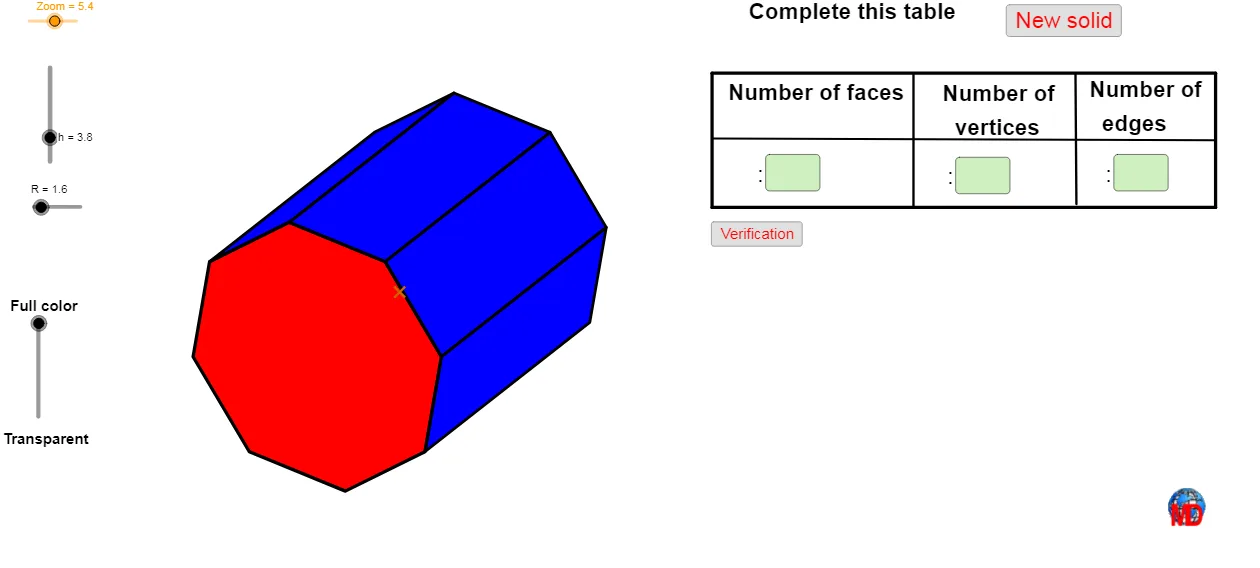
① This interactive 3D GeoGebra example demonstrates Euler's formula V - E + F = 2 for polyhedra, visually showing the invariant relationship among vertices, edges, and faces. ② Core mathematical concepts include Euler's formula, classification of convex polyhedra, and spatial relationships of points, lines, and planes in 3D. ③ Construction highlights: using GeoGebra commands such as Vector, Rotate, Random, Sequence, Join, Midpoint, CurveCartesian, Polygon, Textfield, Point, and Segment, within a 3D view (View3D), the model generates polyhedra with adjustable parameters, manages vertices/edges/faces via lists (liste1 to liste12), and dynamically updates counts. ④ Suitable for upper secondary to undergraduate geometry courses, ideal for verifying Euler's formula, understanding polyhedral structure, and supporting inquiry-based math labs.
GeoGebra Commands & Parameters
Vector(C, Z) → wVector(C, Y) → vVector(C, X) → uRotate(w, β) → w'Rotate(v, β) → v'Rotate(u, β) → u'Random(3, 10) → SidesSequence(A + ((R * cos(((i * 360) * ° / Sides))) * u') + ((R * sin(((i * 360) * ° / Sides))) * v') + (h / 2 * w'), i, 1, Sides) → liste1Sequence(A + ((R * cos(((i * 360) * ° / Sides))) * u') + ((R * sin(((i * 360) * ° / Sides))) * v') - (h / 2 * w'), i, 1, Sides) → liste2Sequence(A + ((R * cos(((i * 360) * ° / Sides))) * u') + ((R * sin(((i * 360) * ° / Sides))) * v') + (h / 2 * w'), i, 1, Sides) → liste3Sequence(A + ((R * cos(((i * 360) * ° / Sides))) * u') + ((R * sin(((i * 360) * ° / Sides))) * v') - (h / 2 * w'), i, 1, Sides) → liste4Join({liste1, First[liste1]}) → liste5Join({liste2, First[liste2]}) → liste6Join({liste3, First[liste3]}) → liste7Join({liste4, First[liste4]}) → liste8Sequence(If[Angle[Element[liste5, i], Element[liste6, i], Element[liste6, i + 1]] < 180°, Polygon[Element[liste5, i], Element[liste5, i + 1], Element[liste6, i + 1], Element[liste6, i]]], i, 1, Sides) → liste9Sequence(If[Angle[Element[liste5, i], Element[liste5, i + 1], Element[liste7, i + 1]] < 180°, Polygon[Element[liste5, i], Element[liste5, i + 1], Element[liste7, i + 1], Element[liste7, i]]], i, 1, Sides) → liste10Sequence(If[Angle[Element[liste8, i], Element[liste8, i + 1], Element[liste6, i + 1]] < 180°, Polygon[Element[liste6, i], Element[liste6, i + 1], Element[liste8, i + 1], Element[liste8, i]]], i, 1, Sides) → liste11Sequence(If[Angle[Element[liste7, i], Element[liste7, i + 1], Element[liste8, i + 1]] < 180°, Polygon[Element[liste8, i], Element[liste8, i + 1], Element[liste7, i + 1], Element[liste7, i]]], i, 1, Sides) → liste12Midpoint(A, B) → ICurveCartesian(x(I + ((2 * cos(i)) * u) + ((2 * sin(i)) * v)), y(I + ((2 * cos(i)) * u) + ((2 * sin(i)) * v)), i, -0.5235987755982988, 0.5235987755982988) → cPolygon(liste1) → poly1Polygon(liste2) → poly2Polygon(liste2) → poly3Polygon(liste1) → poly4Sequence(If[Angle[Element[liste5, i], Element[liste6, i], Element[liste6, i + 1]] < 180°, Polygon[Element[liste5, i], Element[liste5, i + 1], Element[liste6, i + 1], Element[liste6, i]]], i, 1, Sides) → liste13Midpoint(L, D) → NMidpoint(D, M) → OVector(D, O) → zVector(D, Q + (0.25 * u)) → bMidpoint(D, Q) → SPolygon(View3D, AA, BB, CC) → poly5, view3d, aa, bb, ccTextfield(Faces) → ChampTexte1Textfield(Sommets) → ChampTexte2Textfield(Aretes) → ChampTexte3Polygon(T, U, V, W) → poly6, t, u_1, v_1, w_1Point(t) → A_1Point(v_1) → B_1Segment(A_1, B_1) → fPoint(t) → C_1Segment(C_1, D_1) → gPoint(w_1) → E_1Point(u_1) → F_1Segment(E_1, F_1) → iPolygon(View3D, AA, BB, CC) → q1, j, k, l, m
AI Drawing Prompt Reference
Create a convex polyhedron by adjusting parameters to generate polyhedra with different numbers of sides, showing the relationship between vertices, edges, and faces, ensuring each face is convex. Use vector rotation and random point generation to build the polyhedron, and dynamically update the counts of vertices, edges, and faces.
The prompt above was compiled from the original drawing commands and is for reference only.