
End Behavior of Polynomial Functions
Loading the math board and drawing, please wait…
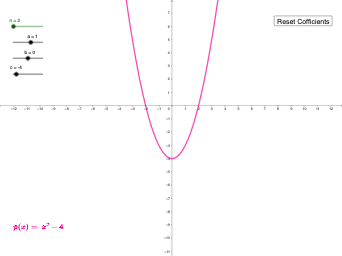
This example demonstrates the behavior of polynomial functions as input values approach infinity. Key mathematical concepts include polynomial function properties, end behavior analysis, and asymptotic trends in function graphs. Construction involves using GeoGebra commands like Sequence, Join, Sum, and Expand to build polynomial expressions, with objects such as i, h, g, f, e, d, c, b, a, n, xp, l1, l2, nc, l4, lc, t, p1, p, text3, button1. Suitable for high school mathematics teaching or university calculus courses to help students understand long-term behavior of polynomial functions.
GeoGebra Commands & Parameters
Sequence(0, n, 1) → xpSequence(x^(xp), xp, n, 1, -1) → l1Sequence(Element[l2, i], i, 1, n + 1) → ncJoin({l1, l4}) → lcSum(t) → p1Expand(Simplify[p1(x)]) → p
AI Drawing Prompt Reference
Plot a graph of a polynomial function to demonstrate its end behavior as input values approach infinity. Start by generating a sequence from 0, then construct polynomial expressions, connect these expressions to form curves, and finally expand and simplify the polynomial expressions. Observe the asymptotic trends in the curves.
The prompt above was compiled from the original drawing commands and is for reference only.