
Ellipse and Locus
Loading the math board and drawing, please wait…
In collections
Locus Line Equations demos
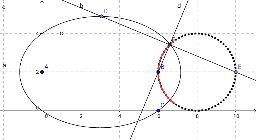
This example demonstrates how to draw an ellipse using GeoGebra and observe its locus as a point moves. Key mathematical concepts include the definition and properties of an ellipse. Commands used include Ellipse, Point, Line, OrthogonalLine, Intersect, Locus, and LocusEquation. Suitable for high school mathematics education and learning about ellipses.
GeoGebra Commands & Parameters
Ellipse(A, B, C) → cPoint(c) → DLine(A, B) → aPoint(a) → ELine(D, E) → bOrthogonalLine(B, b) → dIntersect(b, d) → FLocus(F, D) → loc1LocusEquation(F, D) → e
AI Drawing Prompt Reference
Draw an ellipse with foci A, B, and C. Take a point D on the ellipse. Draw a line a through points A and B. Take a point E on line a, and draw a line d through point B that is perpendicular to DE. Find the intersection F of lines a and d. Observe the locus of point F as point D moves along the ellipse, which is the curve loc1.
The prompt above was compiled from the original drawing commands and is for reference only.