
Dynamic Illustration of Interior and Exterior Angles of Triangles (Polygon Angle
Loading the math board and drawing, please wait…
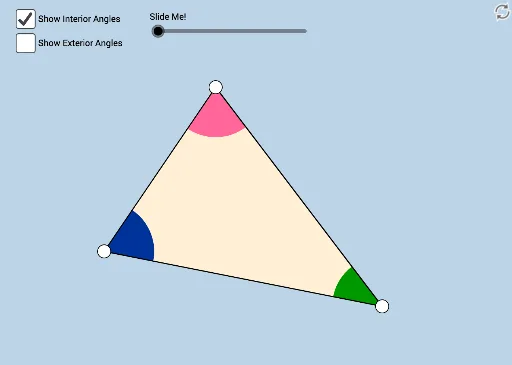
① This interactive GeoGebra example dynamically demonstrates the interior and exterior angle sum theorems for polygons, from triangles up to octagons, allowing users to drag vertices and observe angle changes. ② Core mathematical concepts include the polygon interior angle sum formula (n-2)×180°, the constant exterior angle sum of 360°, the triangle interior angle sum of 180°, and the property that an exterior angle equals the sum of the two non-adjacent interior angles. ③ Construction highlights: the example uses GeoGebra commands such as Polygon, Angle, Segment, Ray, Line, Circle, Intersect, Midpoint, Rotate, Dilate, Vector, Translate, and CircleArc, along with numerous points, segments, circles, and arcs to create a fully adjustable figure. ④ This resource is ideal for middle school geometry lessons, particularly for teaching triangle and polygon angle properties, and can also serve as a review tool for high school students or as a classroom demonstration aid.
GeoGebra Commands & Parameters
Segment(B, C) → eSegment(C, A) → fMin(f, e) → mSegment(A, B) → dMin(d, f) → oMin(m, o) → uPolygon(A, B, C) → poly1, c, a, bRay(A, B) → hRay(B, C) → iRay(C, A) → jCircle(C, (0.25 * u)) → pCircle(A, (0.25 * u)) → qCircle(B, (0.25 * u)) → rIntersect(p, f) → D,Intersect(p, e, 1) → EIntersect(r, e, 1) → FIntersect(r, d, 1) → GIntersect(q, d, 1) → HIntersect(q, f, 1) → IIntersect(r, h, 2) → JIntersect(q, j, 2) → KIntersect(p, i, 2) → LMidpoint(f) → MMidpoint(e) → NCircleSector(A, H, I) → sCircleSector(B, F, G) → tCircleSector(C, D, E) → c_1Angle(A, C, B) → αCircleSector(C, E, D) → d_1CircleSector(A, I, H) → e_1CircleSector(B, G, F) → f_1Min(d, e) → nRotate(s, If[0 < l ≤ 1, (((-l) * 180))°, -180°], M) → s'Rotate(A, If[0 < l ≤ 1, (((-l) * 180))°, -180°], M) → A'Segment(M, A') → a_1Rotate(H, -180°, M) → H'Line(H', C) → b_1Rotate(B, If[0 < l ≤ 1, ((l * 180))°, 180°], N) → B'Rotate(t, If[0 < l ≤ 1, ((l * 180))°, 180°], N) → t'Segment(N, B') → g_1Segment(C, M) → h_1Segment(M, A) → i_1Segment(C, N) → j_1Segment(N, B) → k_1Rotate(A, If[0 < l ≤ 1, ((l * 180))°, -180°], M) → A'_1Rotate(B, If[0 < l ≤ 1, (((-l) * 180))°, -180°], N) → B'_1Segment(N, B'_1) → l_1Segment(M, A'_1) → m_1Rotate(e_1, If[0 < l ≤ 1, ((l * 180))°, -180°], M) → p_1Rotate(f_1, If[0 < l ≤ 1, (((-l) * 180))°, -180°], N) → q_1CircleSector(C, L, D) → r_1CircleSector(A, K, H) → s_1CircleSector(B, J, F) → t_1CircleSector(A, H, K) → c_2CircleSector(B, F, J) → d_2CircleSector(C, D, L) → e_2Dilate(A, 1 - v, C) → A'_2Dilate(B, 1 - v, C) → B'_2Vector(A, A'_2) → wVector(B, B'_2) → u_1Translate(s_1, w) → f_2CircleArc(A, K, H) → g_2Translate(t_1, u_1) → h_2CircleArc(B, J, F) → k_2Translate(c_2, w) → p_2CircleArc(A, H, K) → q_2Translate(d_2, u_1) → r_2CircleArc(B, F, J) → s_2
AI Drawing Prompt Reference
A draggable triangle with its sides extended as rays; at each vertex a circle of radius one‑quarter the shortest side is drawn, intersecting the sides and extensions to mark points. These points define colored circular sectors for the interior and exterior angles. A slider animates the rotation of the sectors, illustrating that the interior angles sum to 180° and the exterior angles sum to 360°, while midpoints and rotated auxiliary segments are also shown.
The prompt above was compiled from the original drawing commands and is for reference only.