
Dynamic Demonstration of Slanted Cone
Loading the math board and drawing, please wait…
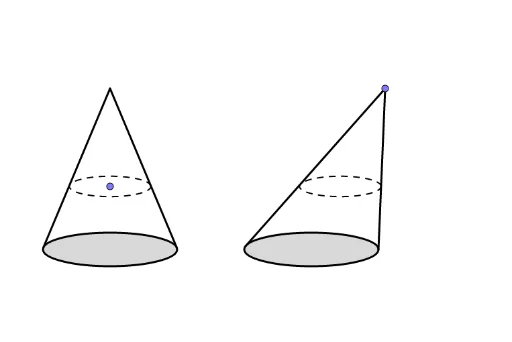
This example dynamically shows a cone and a slanted cone to demonstrate that they have the same volume. Key mathematical concepts include volume calculation and coordinate geometry. GeoGebra commands such as Line, OrthogonalLine, and Point are used in construction. Suitable for high school geometry and solid geometry studies.
GeoGebra Commands & Parameters
Line(B, A) → fOrthogonalLine(E, f) → gPoint(g) → FTangent(F, c) → h, iIntersect(c, h, 1) → CIntersect(c, i, 1) → DSegment(F, C) → jSegment(F, D) → kLine(F, f) → lPoint(l) → GTangent(G, d) → m, nIntersect(d, m, 1) → HIntersect(d, n, 1) → ISegment(G, H) → pSegment(G, I) → qSegment(F, E) → rSegment(G, J) → sPoint(r) → KOrthogonalLine(K, r) → tIntersect(t, s) → LSegment(K, E) → eSegment(L, J) → f_1
AI Drawing Prompt Reference
Draw a cone and a slanted cone to demonstrate that they have the same volume. Start by sketching the base and generatrix of the cone, then do the same for the slanted cone. Next, locate the apex of both cones and draw their axes of symmetry. Then, find the parallel section to the base of the cone on the axis of the slanted cone and draw the intersection lines. Finally, color the cones differently and label key points for clarity.
The prompt above was compiled from the original drawing commands and is for reference only.