
Duality of Polyhedra
Loading the math board and drawing, please wait…
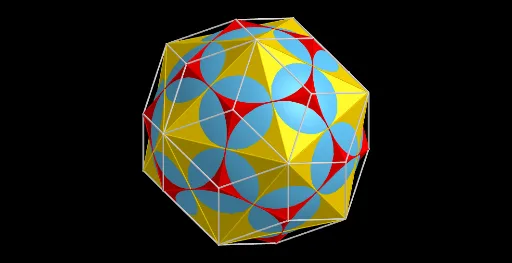
This example demonstrates the duality of polyhedra. Key mathematical concepts include polyhedra and duality. Using GeoGebra commands such as Point, Dodecahedron, Midpoint, Line, etc., it constructs a polyhedron and its dual. Suitable for high school geometry learners and anyone interested in the duality of polyhedra.
GeoGebra Commands & Parameters
Point(Circle[(((1 - sqrt(5)) * A) + ((3 + sqrt(5)) * B)) / 4, (Distance[A, B] * sqrt(10 + (2 * sqrt(5))) / 4), Segment[A, B]]) → CDodecahedron(A, B, C) → a, D, M, N, O, P, Q, R, S, T, ABCDE, AEIOJ, E, ABFKJ, BCGLF, CDHMG, DEINH, INSTO, JKPTO, FKPQL, GLQRM, HMRSN, PQRST, F, AE, AB, BC, CD, DE, AJ, EI, IO, JO, JK, G, FK, BF, FL, GL, CG, GM, HM, DH, HN, IN, H, NS, ST, OT, PT, KP, PQ, LQ, QR, MR, RS, I, J, K, LMidpoint(IN) → UMidpoint(I, L) → VLine(V, U) → cMidpoint(NS) → WMidpoint(IO) → ZLine(V, W) → dLine(V, Z) → eOrthogonalPlane(W, d) → fOrthogonalPlane(U, c) → gOrthogonalPlane(Z, e) → hIntersectPath(h, f) → iIntersectPath(f, g) → jIntersect(j, i) → A_1Line(V, I) → kRotate(A_1, 120°, k) → B_1Rotate(B_1, 120°, k) → C_1Icosahedron(A_1, C_1, B_1) → l, D_1, t1, t2, t5, t4, t3, t9, t10, t6, t7, t8, E_1, t13, t14, t19, t16, t18, t20, t17, t15, t12, t11, F_1, arete1, arete2, arete6, arete4, arete8, arete5, arete19, arete3, arete13, arete10, G_1, arete12, arete14, arete11, arete16, arete7, arete9, arete17, arete20, arete18, arete25, H_1, arete26, arete27, arete30, arete21, arete28, arete24, arete29, arete23, arete22, arete15, I_1, J_1, K_1, L_1Polygon(T, A_1, O, D_1) → poly1, t, a_1, o, d_1Polygon(A_1, T, G_1, S) → poly2, a_2, t_1, g_1, sPolygon(A_1, S, F_1, N) → poly3, a_3, s_1, f_1, nPolygon(A_1, O, C_1, I) → poly4, a_4, o_1, c_1, i_1Polygon(A_1, N, B_1, I) → poly5, a_5, n_1, b_1, i_2Polygon(T, D_1, P, G_1) → poly6, t_2, d_2, p, g_2Polygon(R, G_1, S, F_1) → poly7, r, g_3, s_2, f_2Polygon(F_1, H, B_1, N) → poly8, f_3, h_1, b_2, n_2Polygon(B_1, I, C_1, E) → poly9, b_3, i_3, c_2, e_1Polygon(C_1, J, D_1, O) → poly10, c_3, j_1, d_3, o_2Polygon(D_1, J, H_1, K) → poly11, d_4, j_2, h_2, k_1Polygon(D_1, K, J_1, P) → poly12, d_5, k_2, j_3, p_1Polygon(J_1, Q, G_1, P) → poly13, j_4, q, g_4, p_2Polygon(G_1, Q, L_1, R) → poly14, g_5, q_1, l_1, r_1Polygon(L_1, M, F_1, R) → poly15, l_2, m, f_4, r_2Polygon(F_1, M, I_1, H) → poly16, f_5, m_1, i_4, h_3Polygon(D, B_1, H, I_1) → poly17, d_6, b_4, h_4, i_5Polygon(D, E_1, E, B_1) → poly18, d_7, e_2, e_3, b_5Polygon(E, C_1, A, E_1) → poly19, e_4, c_4, a_6, e_5Polygon(C_1, J, H_1, A) → poly20, c_5, j_5, h_5, a_7Polygon(H_1, F, J_1, K) → poly21, h_6, f_6, j_6, k_3Polygon(F, K_1, L, J_1) → poly22, f_7, k_4, l_3, j_7Polygon(J_1, L, L_1, Q) → poly23, j_8, l_4, l_5, q_2Polygon(L_1, G, K_1, L) → poly24, l_6, g_6, k_5, l_7Polygon(L_1, G, I_1, M) → poly25, l_8, g_7, i_6, m_2Polygon(E_1, C, I_1, D) → poly26, e_6, c_6, i_7, d_8Polygon(C, I_1, G, K_1) → poly27, c_7, i_8, g_8, k_6Polygon(C, K_1, B, E_1) → poly28, c_8, k_7, b_6, e_7Polygon(B, H_1, A, E_1) → poly29, b_7, h_7, a_8, e_8Polygon(B, K_1, F, H_1) → poly30, b_8, k_8, f_8, h_8Distance(V, U) → uSphere(V, (v / 5 * u)) → b
AI Drawing Prompt Reference
Construct in 3D a regular dodecahedron and its dual. Start by defining a base segment from which the initial geometry determines the dodecahedron vertices and its reference points. Use midpoints of specific edge-related point sets to create three key lines, then build three orthogonal planes through these lines. Intersect the corresponding plane pairs to obtain three primary intersection points, and from them form the dual polyhedron’s vertex set via a rotationally defined triangle. Finally, draw all polygonal faces as quadrilaterals by connecting the appropriate vertices in the specified cyclic orders, assembling the full dual polyhedron so that faces match the dodecahedron’s duality structure.
The prompt above was compiled from the original drawing commands and is for reference only.