
Drawing Transformed Images
Loading the math board and drawing, please wait…
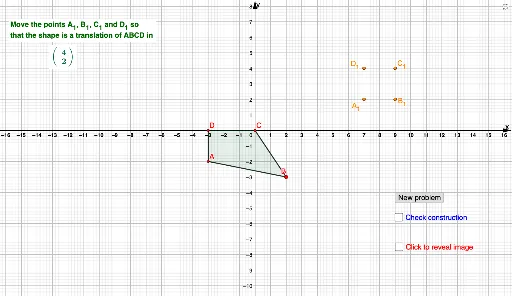
This example demonstrates how to draw the image of a shape under a translation transformation using GeoGebra. Key math concepts include vectors, polygons, coordinate geometry, and transformation. It utilizes commands like Random, Vector, Polygon, Segment, Translate, DynamicCoordinates, and If. Suitable for high school students learning geometric transformations and their applications.
GeoGebra Commands & Parameters
Random(-6, 6) → e_1Random(-6, 6) → wVector((0, 0), (w, e_1)) → u_1Random(-3, 3) → aRandom(-3, 3) → bRandom(-3, 3) → cRandom(-3, 3) → dRandom(-3, 3) → eRandom(-3, 3) → fRandom(-3, 3) → gRandom(-3, 3) → hPolygon(A, B, C, D) → q1, a_1, b_1, c_1, d_1Segment(A, B) → iSegment(B, C) → jSegment(C, D) → kSegment(D, A) → lRandom(-2, 2) → mRandom(-2, 2) → nRandom(-1, 1) → oTranslate(B, u_1) → B'Translate(C, u_1) → C'Translate(D, u_1) → D'Translate(A, u_1) → A'Polygon(A', B', C', D') → q1', a', b', c', d'DynamicCoordinates(G, round(x(G)), round(y(G))) → A_1DynamicCoordinates(H, round(x(H)), round(y(H))) → B_1DynamicCoordinates(E, round(x(E)), round(y(E))) → C_1DynamicCoordinates(F, round(x(F)), round(y(F))) → D_1Polygon(A_1, B_1, C_1, D_1) → q2, p, r, s, tSegment(C_1, D_1) → f_1Segment(A_1, D_1) → g_1Segment(A_1, B_1) → h_1Segment(B_1, C_1) → i_1Segment(D_1, A_1) → j_1If(A_1 ≟ A' ∧ B_1 ≟ B' ∧ C_1 ≟ C' ∧ D_1 ≟ D', "Correct!", "No. Try again.") → text1
AI Drawing Prompt Reference
Draw a random quadrilateral with vertices chosen randomly in the range -3 to 3. Create a random translation vector starting at the origin with endpoint coordinates between -6 and 6. Translate the original quadrilateral by this vector to form a congruent second quadrilateral. Additionally, place four draggable points on the canvas that snap to nearest integer coordinates, and connect them to form a third quadrilateral. Finally, display text that says "Correct!" when the third quadrilateral's vertices exactly match the translated quadrilateral's vertices, otherwise show "No. Try again.".
The prompt above was compiled from the original drawing commands and is for reference only.