
Draw Similar Parallelograms
Loading the math board and drawing, please wait…
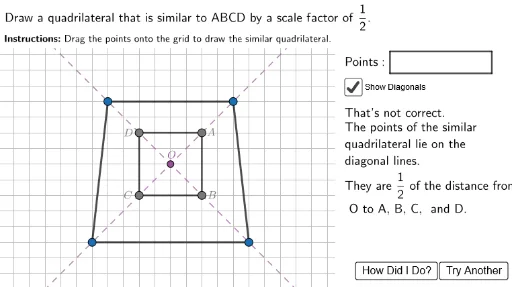
This example demonstrates how to construct similar parallelograms. It involves core mathematical concepts such as properties of parallelograms, similarity criteria for shapes, and geometric transformations. GeoGebra commands and objects like Join, Point, Sort, Polygon, If, Circle, Ray, Rotate, Angle, Segment, Line, LaTeX, Random are used in the construction. Suitable for high school students to learn and understand the construction methods of similar shapes and applications of geometric transformations.
GeoGebra Commands & Parameters
Join({Sequence[Sequence[(i, j), i, -10, 10, 1], j, -10, 10, 1], {(15, 6.5), (16.5, 6.5), (18, 6.5), (19.5, 6.5)}}) → GridSpacePoint(GridSpace) → A1Point(GridSpace) → B1Point(GridSpace) → C1Point(GridSpace) → D1Sort({A1, B1, C1, D1}) → ListXPolygon((10.5, 9), (25, 9), (25, -10), (10.5, -10)) → RightBox, j, k, l, mPolygon((14, 7.2), (14, 5.8), (20.5, 5.8), (20.5, 7.2)) → PointsBox, n, p, q, rPolygon((-12, 7.4), (25, 7.4), (25, 15), (-12, 15)) → TopBox, f, g, h, iIf(y(Element[ListX, 1]) ≥ y(Element[ListX, 2]) ∧ y(Element[ListX, 3]) ≥ y(Element[ListX, 4]) ∨ y(Element[ListX, 1]) ≤ y(Element[ListX, 2]) ∧ y(Element[ListX, 3]) ≤ y(Element[ListX, 4]), Polygon[Element[ListX, 2], Element[ListX, 1], Element[ListX, 3], Element[ListX, 4]], Polygon[Element[ListX, 1], Element[ListX, 2], Element[ListX, 3], Element[ListX, 4]]) → ABC1Polygon(Acorr, Bcorr, Ccorr, Dcorr) → ABCcorr, i_1, j_1, k_1, l_1Circle((0, 0), 7) → Circ1Point(Circ1) → RotPtRay(C, RotPt) → sRotate(RotPt, (angledisp * π / 180)) → RotPtbRay(C, RotPtb) → tAngle(RotPtb, C, RotPt) → HelpAngleSegment((0, 7.3), (0, -8)) → yaxisPolygon(A, B, C, D) → q1, a, b, c, dLine(A, C) → DiagL1Line(D, B) → DiagL2LaTeX("\textbf{Instructions\text{:}}\ Drag\ the\ points\ onto\ the\ grid\ to\ draw\ the\ similar\ quadrilateral.") → Instructions2Random(0, 1) → UDShiftDirectionRandom(0, 1) → LRShiftDirectionLaTeX("Draw\ a\ quadrilateral\ that\ is\ similar\ to\ ABCD\ by\ a\ scale\ factor\ of\ " + ScaleDisplay + ".") → Instructions1If(ScaleIndex ≟ 1 ∨ ScaleIndex ≟ 2 ∨ ScaleIndex ≟ 3, LaTeX["of\ the\ distance\ from\\ O\ to\ A,\,B,\,C,\, and\ D."], LaTeX["times\ as\ far\ from\\ O\ as\ A,\,B,\,C,\, and\ D."]) → ScaleWordingLaTeX("The\ quadrilateral\ you\\ have\ drawn\ is\ similar\ to\\ ABCD\ but\ not\ by\ a\\ scale\ factor\ of\ " + ScaleDisplay + ".\\ Use\ the\ grid\ to\ place\ the\\ points\ " + ScaleDisplay + "\ " + ((ScaleWording * "."))) → FBSimilarSort({A, B, C, D}) → SortedQuadList
AI Drawing Prompt Reference
Draw a parallelogram on a grid and create a similar one using rotation and translation. First, select four points on the grid to form a parallelogram, then rotate this parallelogram around one of its vertices by a certain angle to get a new parallelogram. Ensure the two parallelograms are similar and display the relationships between their corresponding sides and angles.
The prompt above was compiled from the original drawing commands and is for reference only.