
Draw Line Given Slope
Loading the math board and drawing, please wait…
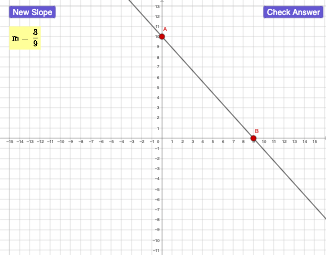
This example demonstrates how to draw a line given its slope. The key mathematical concepts include linear functions, the relationship between slope and intercept, and graphing lines. Construction involves GeoGebra commands like Line, Slope, and RandomElement to create line objects. Suitable for middle or high school mathematics education to understand the connection between linear equations and graphical representation.
GeoGebra Commands & Parameters
Random(1, 10) → aRandom(1, 10) → bRandomElement({-1, 1}) → sLine(A, B) → fSlope(f) → m_1If(anscorrect ≟ true, 1, 0) → feedbackIf(anscorrect ≟ true, 1, 0) → cIf(anscorrect ≟ true, 1, 0) → dIf(anscorrect ≟ true, 1, 0) → eIf(anscorrect ≟ true, 1, 0) → gIf(anscorrect ≟ true, 1, 0) → hIf(anscorrect ≟ true, 1, 0) → i
AI Drawing Prompt Reference
On a coordinate plane, draw a line by first selecting two random numbers to define two points and thus determine the line’s position. Then randomly choose the slope from the set {-1, 1}, and ensure the drawn line corresponds to that selected slope. Display the resulting line together with the relationship between the line and its slope, so the graph’s direction matches the chosen slope, illustrating how slope affects linear graphs.
The prompt above was compiled from the original drawing commands and is for reference only.