
Double Möbius Band Demonstration
Loading the math board and drawing, please wait…
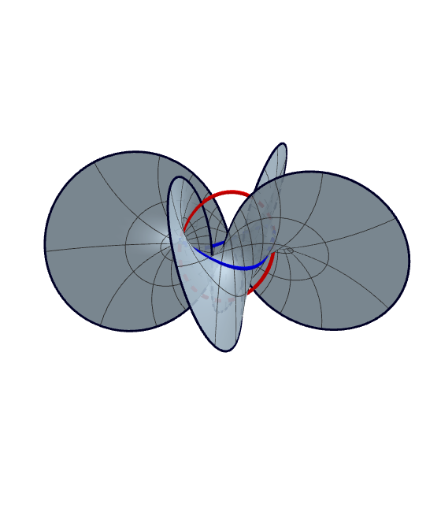
This example demonstrates the construction and visualization of a Double Möbius Band. It involves core mathematical concepts such as surface, functions, quadratic equations, fractions, intersection, and random variables. The construction uses GeoGebra commands like CurveCartesian and Surface, along with objects like X, Y, Z, a, b, vkurve, ukurve, flaeche, r1, r2, and text elements. It is suitable for high school and above students to understand complex surface construction and parametric representation.
GeoGebra Commands & Parameters
CurveCartesian(X(t, b), Y(t, b), Z(t, b), t, (-π), π) → vkurveCurveCartesian(X(a, t), Y(a, t), Z(a, t), t, (-π), π) → ukurveSurface(X(u, v), Y(u, v), Z(u, v), u, (-π), π, v, -1, 1) → flaecheCurveCartesian(X(t, 1), Y(t, 1), Z(t, 1), t, (-π), π) → r1CurveCartesian(X(t, -1), Y(t, -1), Z(t, -1), t, (-π), π) → r2
AI Drawing Prompt Reference
Draw a double Möbius band. The figure consists of a central circle and a connected ring with a twisted surface. Key objects include the central circle, the ring's surface, and connecting curves. The construction order is to first draw the central circle, then the ring's surface, and finally add connecting curves to show their relationship.
The prompt above was compiled from the original drawing commands and is for reference only.