
Dodecahedron
Loading the math board and drawing, please wait…
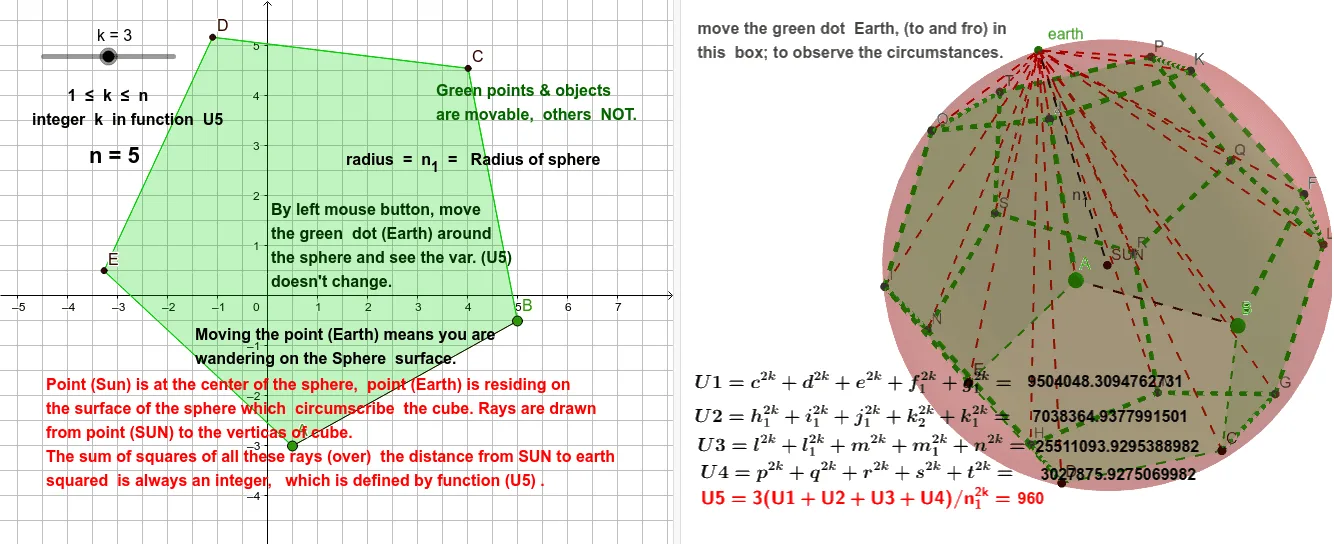
This example demonstrates the geometric construction and properties of a dodecahedron, involving core math concepts like polygons, solid geometry, symmetry, spheres, and geometric transformations. It uses commands such as Polygon, Dodecahedron, Barycenter, Sphere, PointIn, and Segment in GeoGebra. Suitable for high school students and math enthusiasts learning solid geometry and geometric constructions.
GeoGebra Commands & Parameters
Polygon(A, B, 5) → poly1, f, g, h, i, j, C, D, EDodecahedron(poly1, true) → a, F, O, P, Q, R, S, T, faceAEIOJ, faceABFKJ, faceBCGLF, faceCDHMG, G, faceDEINH, faceINSTO, faceJKPTO, faceFKPQL, faceGLQRM, faceHMRSN, facePQRST, edgeAJ, edgeEI, edgeIO, H, edgeJO, edgeJK, edgeFK, edgeBF, edgeFL, edgeGL, edgeCG, edgeGM, edgeHM, edgeDH, I, edgeHN, edgeIN, edgeNS, edgeST, edgeOT, edgePT, edgeKP, edgePQ, edgeLQ, edgeQR, J, edgeMR, edgeRS, K, L, M, NBarycenter({M, G, L, F, K, J, O, I, N, H, R, Q, P, T, S, D, C, B, A, E}, {1, 1, 1, 1, 1, 1, 1, 1, 1, 1, 1, 1, 1, 1, 1, 1, 1, 1, 1, 1}) → SUNSphere(SUN, L) → bPointIn(b) → earthSegment(Q, earth) → g_1Segment(R, earth) → f_1Segment(D, earth) → eSegment(S, earth) → dSegment(I, earth) → cSegment(N, earth) → k_2Segment(H, earth) → lSegment(M, earth) → mSegment(G, earth) → nSegment(L, earth) → pSegment(F, earth) → qSegment(K, earth) → rSegment(J, earth) → sSegment(O, earth) → tSegment(B, earth) → h_1Segment(P, earth) → i_1Segment(A, earth) → j_1Segment(E, earth) → k_1Segment(T, earth) → l_1Segment(C, earth) → m_1Segment(SUN, earth) → n_1