
Distance Between Two Points on a Number Line
Loading the math board and drawing, please wait…
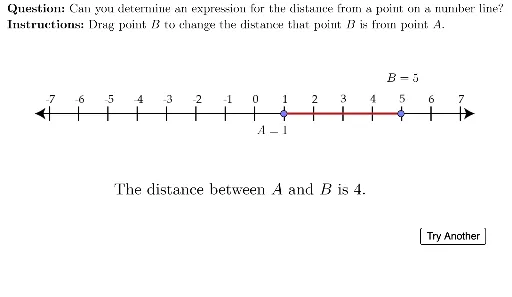
This example demonstrates the calculation of the distance between two points on a number line. Key mathematical concepts include the number line, points, and segments. Using GeoGebra commands such as Point and Segment, the construction process is visually illustrated. Suitable for students at the junior high school level and above.
GeoGebra Commands & Parameters
Point(Segment[(-7, 0), (7, 0)]) → APoint(Segment[(-7, 0), (7, 0)]) → BSegment(A, B) → distanceSegLaTeX(("A=" * x(A))) → lblALaTeX(("B=" * x(B))) → lblBLaTeX((("\text{The distance between \(A\) and \(B\) is " * distanceSeg) * ".}")) → txtDistanceLaTeX((((("\text{\textbf{Question: }" * MainInstruc) * "\\\textbf{Instructions: }") * SpecInstruc) * "}")) → allInstruc
AI Drawing Prompt Reference
Draw a horizontal number line from -7 to 7. Place two draggable points on it, each representing a different number. Connect them with a segment. Display the x-coordinates of the two points as labels, such as "A=..." and "B=...". Below the line, show a text stating that the distance between the two points equals the segment length, along with a question and instructions prompting the user to drag the points to observe how the distance changes. Keep the layout clear for middle school students to grasp the concept of distance on a number line.
The prompt above was compiled from the original drawing commands and is for reference only.