
Diagonals of a Dodecahedron
Loading the math board and drawing, please wait…
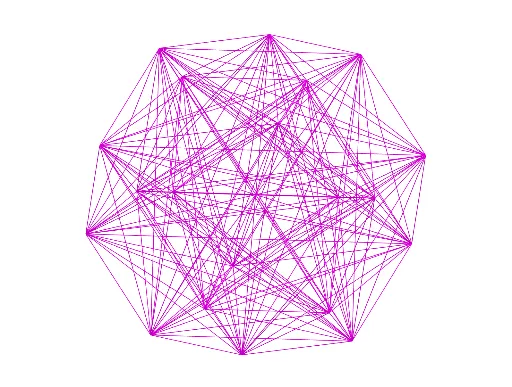
This GeoGebra example demonstrates the spatial distribution and geometric relationships of various diagonals within a regular dodecahedron. It focuses on solid geometry concepts such as polyhedron diagonals, symmetry, and the right triangles, quadrilaterals, and centroid (barycenter) properties formed by these diagonals. The construction uses the Dodecahedron command to generate the solid, Rotate and Point commands to define key vertices, and Sequence, Flatten, and RemoveUndefined to systematically create and process diagonal segments. All twelve faces (e.g., faceABCDE, faceAEIOJ) and several edges (e.g., edgeAE, edgeAB) are explicitly defined to facilitate observation of internal diagonal crossings. This resource is suitable for high school or early college students to explore properties of regular polyhedra, enhance spatial reasoning, and serve as a supplement for teaching symmetry and geometric modeling.
GeoGebra Commands & Parameters
Rotate(A, (2 * π / 5), zAxis) → BPoint(Circle[((A * (1 - sqrt(5))) + (B * (3 + sqrt(5)))) / 4, (Distance[A, B] * sqrt(10 + (2 * sqrt(5))) / 4), Segment[A, B]]) → CDodecahedron(A, B, C) → a, D, M, N, O, P, Q, R, S, T, faceABCDE, faceAEIOJ, E, faceABFKJ, faceBCGLF, faceCDHMG, faceDEINH, faceINSTO, faceJKPTO, faceFKPQL, faceGLQRM, faceHMRSN, facePQRST, F, edgeAE, edgeAB, edgeBC, edgeCD, edgeDE, edgeAJ, edgeEI, edgeIO, edgeJO, edgeJK, G, edgeFK, edgeBF, edgeFL, edgeGL, edgeCG, edgeGM, edgeHM, edgeDH, edgeHN, edgeIN, H, edgeNS, edgeST, edgeOT, edgePT, edgeKP, edgePQ, edgeLQ, edgeQR, edgeMR, edgeRS, I, J, K, LSequence(Sequence[Segment[l1(a), l1(b)], a, 1, Length[l1]], b, 1, Length[l1]) → l2Flatten(l2) → l3RemoveUndefined(l3) → l4
AI Drawing Prompt Reference
Draw a regular dodecahedron, highlighting the spatial distribution and geometric relationships of all its diagonals. Emphasize the symmetry, right triangles, and quadrilaterals formed by the diagonals, and mark the centroid. Construct the dodecahedron first, then rotate and position key vertices to systematically generate and process diagonal segments, finally clearly labeling all twelve faces and some edges to facilitate observation of internal diagonal crossings.
The prompt above was compiled from the original drawing commands and is for reference only.