
Christmas Tree Construction
Loading the math board and drawing, please wait…
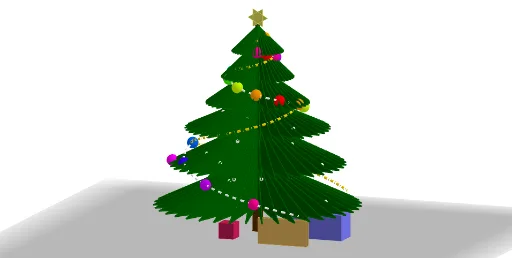
This example dynamically demonstrates the 3D geometric construction of a Christmas tree using GeoGebra. It involves core mathematical concepts such as solid geometry, polygon construction, transformations, and sequences. Key GeoGebra commands and objects used in the construction include Line, Ray, Mirror, Polygon, Sequence, Circle, Cylinder, CurveCartesian, Element, Point, Prism, Cube, and PolyLine. It is suitable for high school geometry instruction and learning geometric constructions.
GeoGebra Commands & Parameters
Line(K_2, yAxis) → i_2Ray(O, B) → aMirror(M, a) → M'Polygon(B, A, K, L, M, D, C, E, F, G, H, I, J) → poly1, b, j, k_{3}, l, m, a_2, d, c_1, e, f, g_1, h, iMirror(B, a) → B'Mirror(M, a) → M'_1Polygon(B, N, A_1, C_1, M, Q, P, R, S, T, U, V, W) → poly2, b_2, w_1, a_3, c_2, m_1, n, q, p, r, s, t, u_1, v_1Line(O, zAxis) → f_1Sequence(Rotate[poly1, i, f_1], i, 0, (2 * π), (2 * π / o)) → l1Circle(O, 0.05, f_1) → cCylinder(c, 0.25) → a_1, e_2, b_1CurveCartesian(x(O) + ((g_2 * ℯ^((k * i))) * cos(i)), y(O) + ((g_2 * ℯ^((k * i))) * sin(i)), z(O) - ((g_2 * ℯ^((k * i))) * cot(α)) + 2, i, 0, (5.75 * π)) → f_2Sequence((x(O) + ((g_2 * ℯ^((k * i))) * cos(i)), y(O) + ((g_2 * ℯ^((k * i))) * sin(i)), z(O) - ((g_2 * ℯ^((k * i))) * cot(α)) + 2), i, 0, (5.75 * π), π / 5) → l2Element(l2, A1) → B1Element(l2, A2) → B2Element(l2, A3) → B3Element(l2, A4) → B4Element(l2, A5) → B5Element(l2, A6) → B6Element(l2, A7) → B7Element(l2, A8) → B8Element(l2, A9) → B9Element(l2, A10) → B10Element(l2, A11) → B11Element(l2, A12) → B12Element(l2, A13) → B13Element(l2, A14) → B14Element(l2, A15) → B15Element(l2, A16) → B16Element(l2, A17) → B17Element(l2, A18) → B18Element(l2, A19) → B19Element(l2, A20) → B20Element(l2, A21) → B21Element(l2, A22) → B22Element(l2, A23) → B23Element(l2, A24) → B24Element(l2, A25) → B25Element(l2, A26) → B26Element(l2, A27) → B27Element(l2, A28) → B28Element(l2, A29) → B29Element(l2, A30) → B30Element(l2, A31) → B31Element(l2, A32) → B32Element(l2, A33) → B33Element(l2, A34) → B34Element(l2, A35) → B35Element(l2, A36) → B36Element(l2, A37) → B37Element(l2, A38) → B38Element(l2, A39) → B39Element(l2, A40) → B40Element(l2, A41) → B41Element(l2, A42) → B42Element(l2, A43) → B43Element(l2, A44) → B44Element(l2, A45) → B45Element(l2, A46) → B46Element(l2, A47) → B47Element(l2, A48) → B48Element(l2, A49) → B49Element(l2, A50) → B50Element(l2, A51) → B51Element(l2, A52) → B52Element(l2, A53) → B53Element(l2, A54) → B54Element(l2, A55) → B55Element(l2, A56) → B56Element(l2, A57) → B57Element(l2, A58) → B58Element(l2, A59) → B59Element(l2, A60) → B60Element(l2, A61) → B61Element(l2, A62) → B62Element(l2, A63) → B63Element(l2, A64) → B64Element(l2, A65) → B65Element(l2, A66) → B66Element(l2, A67) → B67Element(l2, A68) → B68Element(l2, A69) → B69Element(l2, A70) → B70Element(l2, A71) → B71Element(l2, A72) → B72Element(l2, A73) → B73Element(l2, A74) → B74Element(l2, A75) → B75Element(l2, A76) → B76Element(l2, A77) → B77Element(l2, A78) → B78Element(l2, A79) → B79Element(l2, A80) → B80Element(l2, A81) → B81Element(l2, A82) → B82Element(l2, A83) → B83Element(l2, A84) → B84Element(l2, A85) → B85CurveCartesian(x(O) + ((g_2 * ℯ^((k * i))) * cos(i)), y(O) - ((g_2 * ℯ^((k * i))) * sin(i)), z(O) - ((g_2 * ℯ^((k * i))) * cot(α)) + 2, i, 0, (5.75 * π)) → h_2Point(l1) → ZPoint(l1) → B_1Point(l1) → E_2Point(l1) → F_2Point(l1) → G_2Point(l1) → H_2Point(l1) → I_2Circle(J_2 + (0, 0, 0.1), 0.1, yAxis) → p_2Sequence(Rotate[K_2 + (0.1, 0, 0), i, i_2], i, 0, (2 * π), (2 * π / 6)) → l3Polygon(Element[l3, 1], Element[l3, 3], Element[l3, 5]) → t1, j_2, l_2, n_2Polygon(Element[l3, 2], Element[l3, 4], Element[l3, 6]) → t2, h_1, i_1, j_1Polygon(D_1, D_1 + (0.5, 0, 0), D_1 + (0.5, 0.25, 0), D_1 + (0, 0.25, 0)) → q1, d_1, l_1, n_1, p_1Prism(q1, 0.25) → u, E_1, arête1, arête2, arête3, arête4, arête5, arête7, arête8, arête6, F_1, G_1, H_1, face1, face3, face4, face2, face5Polygon(I_1, J_1, 4, xOyPlane) → poly3, q_1, r_1, s_1, t_1, K_1, L_1Point(Circle[N_1, Distance[M_1, N_1], Segment[M_1, N_1]]) → O_1Cube(M_1, N_1, O_1) → e_1, P_1, face10, face11, arête10, arête9, arête12, arête14, arête11, arête16, arête18, arête17, Q_1, arête13, arête19, arête15, arête20, R_1, S_1, T_1, face6, face8, face7, face9Polygon(U_1, U_1 + (0.5, 0, 0), U_1 + (0.5, 0, 0.25), U_1 + (0, 0, 0.25)) → q2, k_2, m_2, q_2, r_2Prism(q2, -0.05) → o_1, V_1, arête21, arête22, arête23, arête24, arête25, arête27, arête28, arête26, W_1, Z_1, A_2, face12, face14, face15, face13, face16PolyLine(B27, G_2, Z, H_2, I_2) → s_2Point(l1) → B_2Point(l1) → C_2Point(l1) → D_2Point(l1) → L_2Point(l1) → M_2Point(l1) → N_2Point(l1) → O_2Point(l1) → P_2Point(l1) → Q_2Point(l1) → R_2Point(l1) → S_2Point(l1) → T_2Point(l1) → U_2Point(l1) → V_2Point(l1) → W_2Point(l1) → Z_2Point(l1) → A_3Point(l1) → B_3Point(l1) → C_3Point(l1) → D_3
AI Drawing Prompt Reference
Create a 3D “Christmas tree construction” style geometric model centered around the origin. Define a vertical axis and a horizontal reference line, then use a mirror operation about a reference plane to build a symmetric side shape. First, form an initial multi-vertex polygon representing one or more base layers of the tree. Use a rotation about the vertical axis to generate repeated segments of this structure around the axis, producing stacked ring-like bands. At the origin, draw a small circle that serves as the base of a cylinder, and extrude it to create the main solid. Add a parameterized 3D curve (a spiral/rotational-trajectory type) rising along the height direction, sample it at multiple parameter values to obtain key layered points that guide how the curve relates to the solid.
The prompt above was compiled from the original drawing commands and is for reference only.