
Cube/Prism Net via Edge-List Rotations
Loading the math board and drawing, please wait…
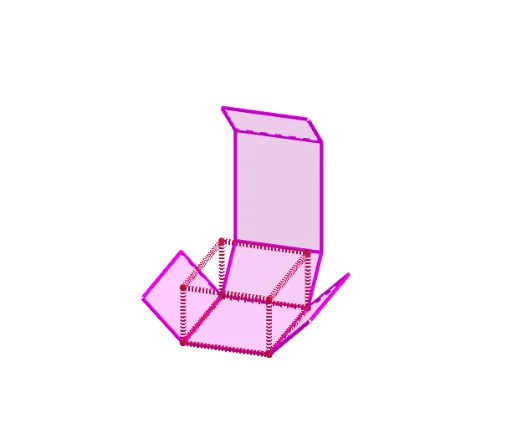
This example demonstrates how to unfold a cube or a prism into a planar net by assembling a sequence of rotations applied around chosen edges. It also illustrates which edges to cut and fold so the rotated faces remain consistent with the original solid. The key math concepts are solid geometry, rotation transformations, nets (unfolding) and the cut-and-fold constraint. Construction-wise, the model uses Polygon to define face boundaries, Prism to generate the base solid, Rotate to rotate faces around specific edges, and Textfield to label parameters or control values. The object set includes points and links involved in the unfolding process (e.g., point collections like Pxy/n/P and edge/face connection lists such as links/left-front-right-back/top-style identifiers), along with multiple resulting nets (net01, net05, net08, net10, net11) produced from different edge-rotation lists. Suitable for teaching and learning transformations and unfolding at advanced secondary level through introductory college geometry.
GeoGebra Commands & Parameters
Polygon(A, B, C, D) → unten, Xlinksunten, Xvornunten, Xrechtsunten, XhintenuntenPrism(unten, h) → e, E, Xhintenlinks, Xvornlinks, Xvornrechts, Xhintenrechts, Xlinksoben, Xvornoben, Xrechtsoben, Xhintenoben, F, G, H, links, vorne, rechts, hinten, obenRotate(Rotate[Rotate[Rotate[vorne, ((-k) * 90°), Xvornlinks], (k * 90°), Xlinksoben], ((-k) * 90°), Xrechtsoben], (k * 90°), Xrechtsunten) → Vrot4AxisTextfield(ROTATION) → InputBox1Polygon(P + {(0, Glb(n, 2), 0), (Glb(n, 1), Glb(n, 2), 0), (Glb(n, 1), 0, 0), (0, 0, 0)}) → GP
AI Drawing Prompt Reference
Create a net of a cube by first defining four base points A, B, C, and D to form a quadrilateral. Then build a cube with height h, and rotate the faces around specific edges to ensure they remain consistent with the original solid. Use rotation operations to generate the net and label the rotation parameters with a text box.
The prompt above was compiled from the original drawing commands and is for reference only.