
Tessellation on a Cube Surface
Loading the math board and drawing, please wait…
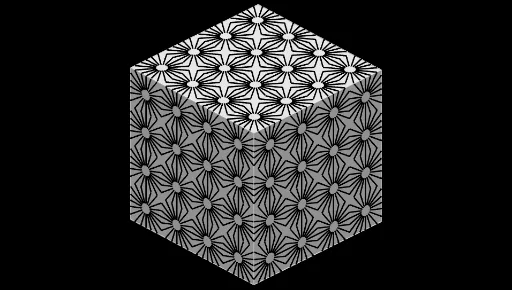
① This example demonstrates how to construct a tessellation pattern on the surface of a cube in 3D space, using a series of segments, vectors, and rotations to generate a regular grid covering the cube's faces. ② Core mathematical concepts include solid geometry of polyhedron surface subdivision, translational and rotational symmetry, and the use of sequences to generate repetitive structures. ③ Construction highlights: from the summary, commands such as Sequence, Segment, Vector, Rotate, Midpoint, Line, Point, and Cube are used, involving objects like cube vertices A, B, C, D, etc., and multiple auxiliary lines (l1-l8) and points (F, G, H, I, J, K, L, M, N), with rotations and vector translations creating tessellation units on each face. ④ Suitable for high school or early college students to explore solid geometry and symmetric patterns, and as a teaching example for mathematical art or computer-assisted geometric design.
GeoGebra Commands & Parameters
Sequence(Rotate[A + ((5 * R), 0), i, A], i, 0, (2 * π), (2 * π / n)) → l2Sequence(Rotate[A + ((0.8 * R), 0), i, A], i, 0, (2 * π), (2 * π / n)) → l1Sequence(Segment[Element[l1, i], Element[l2, i]], i, 1, Length[l1]) → l3Segment(B, C) → fSegment(E, C) → gSegment(E, D) → hSegment(D, B) → iSequence(Intersect[Element[l3, i], f], i, 1, Length[l3]) → l7Sequence(Segment[Element[l1, i], Element[l7, i]], i, 1, Length[l1]) → l6Sequence(Rotate[l6, i, A], i, 0, (2 * π), (2 * π / p)) → l4Vector(B, C) → uVector(B, D) → vSequence(Sequence[Translate[l4, Vector[(i * u) + (j * v)]], i, 0, q], j, 0, r) → l5Rotate(l5, 90°, f) → l5'Midpoint(F, B) → GLine(G, zAxis) → kSequence(Rotate[l5', i, k], i, 0, (2 * π), (2 * π / 4)) → l8Vector(G, G + (0, 0, (24 * R))) → wSegment(H, I) → lRotate(l5', 90°, l) → l5''Point(Circle[J, Distance[B, J], Segment[B, J]]) → KCube(B, J, K) → a, L, faceKLPO, faceMNOP, arêteBL, arêteBJ, arêteJK, arêteKL, arêteBM, arêteLP, arêteMP, arêteMN, M, arêteJN, arêteNO, arêteKO, arêteOP, N, O, P, faceBJKL, faceBLPM, faceBJNM, faceJKON
AI Drawing Prompt Reference
Draw a cube in 3D space with a tessellated pattern on its surface. Start from one vertex as a rotation center, generate two sets of radial segments of different lengths, evenly spaced around that vertex. Connect corresponding endpoints to form triangular or quadrilateral units, then translate these units along the cube's adjacent edge directions to cover the face. Rotate the entire pattern 90 degrees around one edge, then rotate it four times around a vertical axis through the midpoint of an edge to create symmetric patterns on adjacent faces. Repeat similar operations on another side and add a vertical vector to extend the pattern, forming a complete 3D tessellation.
The prompt above was compiled from the original drawing commands and is for reference only.