
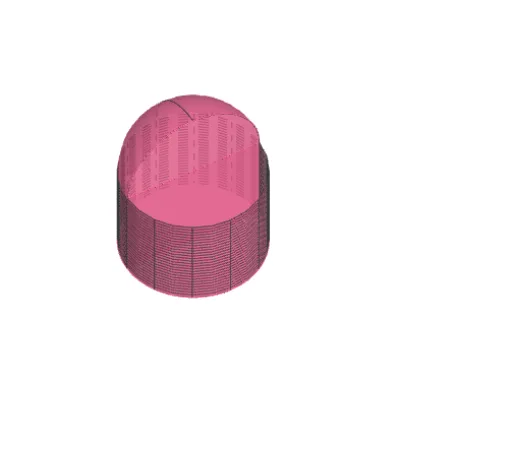
Cylinder + Hemisphere
Loading the math board and drawing, please wait…
This example demonstrates the geometric construction of a cylinder combined with a hemisphere. It involves core mathematical concepts such as solid geometry, surfaces, function graphs, and equilateral triangles. The construction utilizes GeoGebra commands/objects like Circle, Sector, Surface, Sphere, Rotate, Midpoint, Line, Arc, CurveCartesian, and Polygon. Suitable for high school students studying solid geometry, coordinate geometry, and function graphing.
GeoGebra Commands & Parameters
Circle((0, 0), r) → cSector(c, (0, r), (0, (-r))) → dSurface((r * cos(α)), (r * sin(α)), i, α, 90°, 270°, i, 0, h) → aSphere((0, 0, h), r) → bRotate((0, (-r)), β, (0, r)) → AMidpoint((0, r), A) → BCircle(B, r) → gSector(g, A, (0, r)) → kSurface((r * cos(γ)) + x(B), (r * sin(γ)) + y(B), i, γ, 270° + β, 450° + β, i, 0, h) → iMidpoint(C, D) → ELine(D, l) → mCircle(E, r, xOyPlane) → pArc(p, D, C) → qCurveCartesian(((r * cos(u)) + x(E), (r * sin(u)) + y(E), h), u, (3 * π / 2) + (π * s), (5 * π / 2) + (π * s)) → oSurface(o, π / 2, m) → tRotate(Sector[p, D, C], 90°, m) → c_1Polygon(C, D, A, F) → q1, c_2, d_1, a_1, f_1Polygon(F, G, H, C) → q2, f_2, g_1, h_1, c_3Circle(C, H, I) → e_1Sector(e_1, H, C) → k_1
AI Drawing Prompt Reference
Draw a geometric construction combining a cylinder and a hemisphere, showcasing core mathematical concepts. Start by creating a circle and a sector. Then generate a surface to represent the cylinder and draw a sphere. Rotate the sector, find the midpoint, and use it to create another circle and sector for the hemispherical part. Finally, complete the structure by rotating and combining surfaces, arcs, curves, and polygons, highlighting the integration of solid geometry, function graphs, and equilateral triangles.
The prompt above was compiled from the original drawing commands and is for reference only.