
Cycloid Construction and Demonstration
Loading the math board and drawing, please wait…
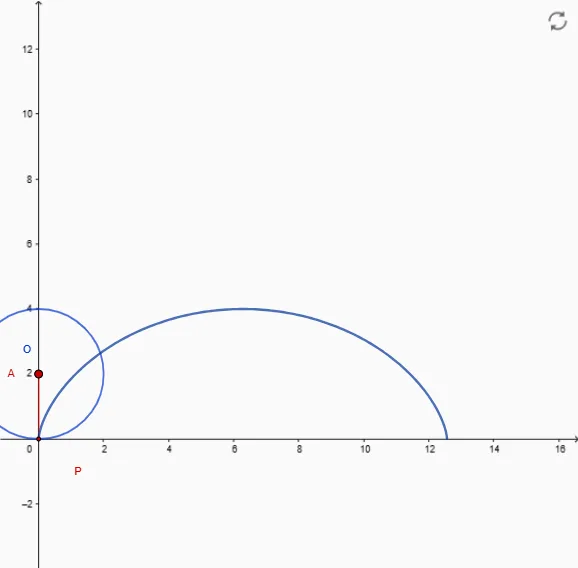
This example demonstrates the generation process and geometric properties of a cycloid. It involves core mathematical concepts such as circle, angles, geometric construction, differential calculus, and parametric equations. GeoGebra commands used include Circle, Intersect, Rotate, Segment, CurveCartesian, LaTeX, Integral, and Locus. Suitable for high school and above mathematics learners to understand the definition, properties, and applications of cycloids in calculus.
GeoGebra Commands & Parameters
Circle(O, R) → cCircle(A, R) → dIntersect(d, xAxis) → B, CRotate(B, ((-x(B))) / R, A) → PSegment(A, P) → iCurveCartesian((R * (t - sin(t))), (R * (1 - cos(t))), t, 0, (2 * pi)) → bLaTeX(b, true, true) → texto3Integral(sqrt((Derivative[g, t])^(2) + (Derivative[h, t])^(2)), 0, (2 * pi)) → lonLocus(P, j) → lugar1
AI Drawing Prompt Reference
Draw a circle with a fixed radius centered at the origin, and another circle of the same radius rolling along the horizontal axis. The two circles intersect the horizontal axis at two points. Take one intersection point, rotate it around the rolling circle's center by an angle equal to the negative of its x-coordinate divided by the radius, obtaining a point on the rolling circle. Connect this point to the rolling circle's center with a segment. Also, draw a cycloid curve using parametric equations from zero to two pi, where x equals radius times (t minus sine t) and y equals radius times (1 minus cosine t). Finally, display the arc length of this cycloid and show a locus point that moves as the rolling circle progresses.
The prompt above was compiled from the original drawing commands and is for reference only.