
Space-Time Unit Circle: Trigonometric Visualization
Loading the math board and drawing, please wait…
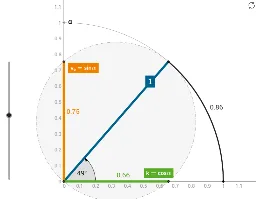
This GeoGebra example demonstrates the geometric representation of the unit circle in a space-time coordinate system, visually illustrating how sine, cosine, and tangent curves emerge through rotation and angle tracking. Core concepts include the unit circle definition, trigonometric function graphs, and parametric equations. Construction uses Point and Circle to build the base unit circle; Rotate and Angle enable dynamic angular variation; Intersect and OrthogonalLine determine projection points; CircleArc draws arc trajectories; Midpoint generates auxiliary points; and sinus, cosinus, tangens values are visualized on the plot. Suitable for high school to undergraduate courses in trigonometry, analytic geometry, and introductory calculus.
GeoGebra Commands & Parameters
Point(yAxis) → BPoint(xAxis) → CPoint(yAxis) → ARay(A, B) → aRay(A, C) → bOrthogonalLine(C, b) → dRotate(C, α, A) → C'Ray(A, C') → eAngle(C, A, Rotate[C, α, A]) → α_1OrthogonalLine(C', b) → fOrthogonalLine(C', a) → gIntersect(g, a) → VeIntersect(f, b) → kSegment(A, Ve) → sinusSegment(A, k) → cosinusIntersect(e, d) → Vi2Segment(C, Vi2) → tangensIntersect(f, g) → DCircleArc(A, C, D) → ArcLine(Vi2, b) → hSegment(Ve, C') → iSegment(C', k) → jPoint(Arc) → FMidpoint(D, A) → JCircle(J, A) → pRay(D, Vi2) → qPoint(d) → KSegment(K, C) → rPoint(q) → LMidpoint(Vi2, D) → MPoint(q) → ORay(A, Vi2) → a_1Ray(A, Vi2) → k_1Point(k_1) → ESegment(D, Vi2) → exsecMidpoint(D, A) → PCircleArc(A, C, B) → cPoint(yAxis) → QPoint(xAxis) → RMidpoint(D, A) → SCircle(S, D) → sSegment(D, A) → secans
AI Drawing Prompt Reference
Draw a unit circle centered at the origin with two perpendicular axes. From the origin, draw two rays along the axes to form a right angle. Place a moving point on the circle, rotate it around the origin, and track the angle. From this point, drop perpendiculars to both axes, marking the intersections to show sine and cosine segments. Extend the line from the origin through the moving point to intersect a tangent line at the circle's fixed point, creating the tangent segment. Also draw an arc from the origin through the moving point, and add auxiliary segments for secant and cosecant. This visualizes trigonometric functions as the angle changes.
The prompt above was compiled from the original drawing commands and is for reference only.