
Curves on a Sphere
Loading the math board and drawing, please wait…
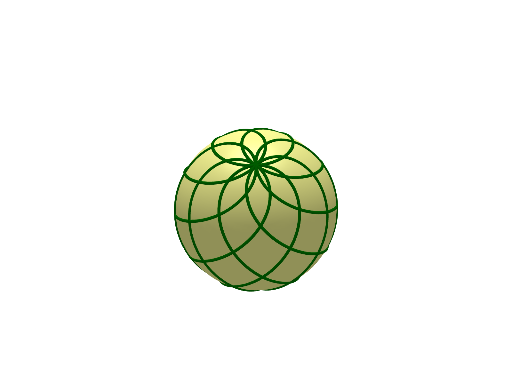
This example demonstrates how to draw and interact with parametric curves on a sphere, involving core mathematical concepts like parametric equations, solid geometry, and curves/surfaces. It utilizes GeoGebra commands and objects such as Intersect, Surface, Sequence, and Sphere. Suitable for high school and above students exploring spatial geometry and properties of parametric curves.
GeoGebra Commands & Parameters
Intersect(zAxis, xAxis) → ASurface((R / 2 * (cos(u) + cos(v))), (R / 2 * (sin(u) + sin(v))), (R * sin((u - v) / 2)), u, (-π), π, v, (-π), π) → aSequence(CurveCartesian[(R / 2 * (cos(rte) + cos(v))), (R / 2 * (sin(rte) + sin(v))), (R * sin((rte - v) / 2)), v, (-10 * π), (10 * π)], rte, 0, (2 * π), π / 4) → l1, {((1.4 / 2 * (cos(0) + cos(v))), (1.4 / 2 * (sin(0) + sin(v))), (1.4 * sin((0 - v) / 2))), ((1.4 / 2 * (cos(0.7853981633974483) + cos(v))), (1.4 / 2 * (sin(0.7853981633974483) + sin(v))), (1.4 * sin((0.7853981633974483 - v) / 2))), ((1.4 / 2 * (cos(1.5707963267948966) + cos(v))), (1.4 / 2 * (sin(1.5707963267948966) + sin(v))), (1.4 * sin((1.5707963267948966 - v) / 2))), ((1.4 / 2 * (cos(2.356194490192345) + cos(v))), (1.4 / 2 * (sin(2.356194490192345) + sin(v))), (1.4 * sin((2.356194490192345 - v) / 2))), ((1.4 / 2 * (cos(3.141592653589793) + cos(v))), (1.4 / 2 * (sin(3.141592653589793) + sin(v))), (1.4 * sin((3.141592653589793 - v) / 2))), ((1.4 / 2 * (cos(3.9269908169872414) + cos(v))), (1.4 / 2 * (sin(3.9269908169872414) + sin(v))), (1.4 * sin((3.9269908169872414 - v) / 2))), ((1.4 / 2 * (cos(4.71238898038469) + cos(v))), (1.4 / 2 * (sin(4.71238898038469) + sin(v))), (1.4 * sin((4.71238898038469 - v) / 2))), ((1.4 / 2 * (cos(5.497787143782138) + cos(v))), (1.4 / 2 * (sin(5.497787143782138) + sin(v))), (1.4 * sin((5.497787143782138 - v) / 2))), ((1.4 / 2 * (cos(6.283185307179586) + cos(v))), (1.4 / 2 * (sin(6.283185307179586) + sin(v))), (1.4 * sin((6.283185307179586 - v) / 2)))}Sphere(A, R) → b
AI Drawing Prompt Reference
Draw a sphere centered at the coordinate origin with radius R, and place on it a set of parametric curves defined on the sphere. First construct the sphere surface, using the standard trigonometric parameterization in terms of two parameters u and v to describe a reference spherical patch. Then define a family of curves on the same sphere by using a parameter r for an initial angle (sample several values along r) and a second parameter v ranging from -10π to 10π, generating multiple curve instances. The resulting figure should show how these parametric curves sit and interact on the spherical surface.
The prompt above was compiled from the original drawing commands and is for reference only.