
Cubic Spline Functions with n Support Points
Loading the math board and drawing, please wait…
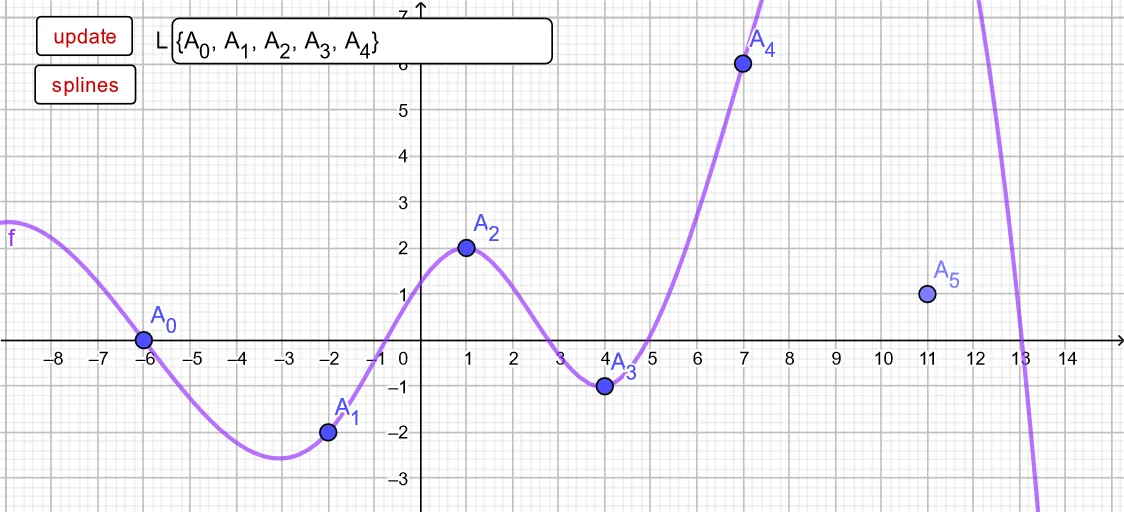
This GeoGebra example demonstrates how to construct a cubic spline interpolation curve through n given support points (Stützstellen), producing a smooth piecewise cubic polynomial function. The core mathematical concept is spline interpolation: each interval is fitted with a cubic polynomial while ensuring continuity of the function value, first derivative, and second derivative at the knots, resulting in an overall smooth curve. Construction highlights include using the Sequence command to generate the support point list, Join to combine piecewise expressions, UnicodeToText and Textfield for dynamically displaying the spline function text, a slider n to control the number of support points, and buttons to toggle between the full spline and individual segment functions. This example is suitable for high school to university-level mathematics teaching, useful for understanding interpolation, piecewise functions, polynomial approximation, and numerical analysis spline methods, and also serves as a reference for advanced interactive GeoGebra design.
GeoGebra Commands & Parameters
Sequence(((1, 0) * Element[L, i]), i, 1, n + 1) → X, {-6, -2, 1, 4, 7}Sequence(((0, 1) * Element[L, i]), i, 1, n + 1) → Y, {0, -2, 2, -1, 6}Join({{0}, Sequence[Element[Y, i], i, 1, n], Sequence[Element[Y, i], i, 2, n + 1], Sequence[0, i, 1, (4 * n) - (2 * n) - 1]}) → bSequence(Take[Join[{If[k > 1, Sequence[0, i, 1, (4 * (k - 1))], {}], {(6 * Element[X, k + 1]), 2}, {0, 0}, {(-6 * Element[X, k + 1]), -2}, {0, 0}, Sequence[0, i, 1, (4 * (n - k))]}], 1, (4 * n)], k, 1, n - 1) → s5, {{-12, 2, 0, 0, 12, -2, 0, 0, 0, 0, 0, 0, 0, 0, 0, 0}, {0, 0, 0, 0, 6, 2, 0, 0, -6, -2, 0, 0, 0, 0, 0, 0}, {0, 0, 0, 0, 0, 0, 0, 0, 24, 2, 0, 0, -24, -2, 0, 0}}Sequence(Take[Join[{If[k > 1, Sequence[0, i, 1, (4 * (k - 1))], {}], {(3 * Element[X, k + 1]^(2)), (2 * Element[X, k + 1]), 1}, {0}, {(-3 * Element[X, k + 1]^(2)), (-2 * Element[X, k + 1]), -1}, {0}, Sequence[0, i, 1, (4 * (n - k))]}], 1, (4 * n)], k, 1, n - 1) → s4, {{12, -4, 1, 0, -12, 4, -1, 0, 0, 0, 0, 0, 0, 0, 0, 0}, {0, 0, 0, 0, 3, 2, 1, 0, -3, -2, -1, 0, 0, 0, 0, 0}, {0, 0, 0, 0, 0, 0, 0, 0, 48, 8, 1, 0, -48, -8, -1, 0}}Sequence(Join[{Sequence[0, i, 1, (4 * (k - 1))], Sequence[Element[X, k + 1]^(i), i, 3, 0, -1], Sequence[0, i, 1, (4 * (n - k))]} \ {}], k, 1, n) → s3, {{-8, 4, -2, 1, 0, 0, 0, 0, 0, 0, 0, 0, 0, 0, 0, 0}, {0, 0, 0, 0, 1, 1, 1, 1, 0, 0, 0, 0, 0, 0, 0, 0}, {0, 0, 0, 0, 0, 0, 0, 0, 64, 16, 4, 1, 0, 0, 0, 0}, {0, 0, 0, 0, 0, 0, 0, 0, 0, 0, 0, 0, 343, 49, 7, 1}}Sequence(Join[{Sequence[0, i, 1, (4 * (k - 1))], Sequence[Element[X, k]^(i), i, 3, 0, -1], Sequence[0, i, 1, (4 * (n - k))]} \ {}], k, 1, n) → s2, {{-216, 36, -6, 1, 0, 0, 0, 0, 0, 0, 0, 0, 0, 0, 0, 0}, {0, 0, 0, 0, -8, 4, -2, 1, 0, 0, 0, 0, 0, 0, 0, 0}, {0, 0, 0, 0, 0, 0, 0, 0, 1, 1, 1, 1, 0, 0, 0, 0}, {0, 0, 0, 0, 0, 0, 0, 0, 0, 0, 0, 0, 64, 16, 4, 1}}Join({s1, s2, s3, s4, s5, s6}) → MSequence(Sum[(Element[M_{-1}, i] * b)], i, 1, (4 * n)) → a_i, {0.050715488215488234, 0.9128787878787881, 4.165824915824917, 3.0858585858585856, -0.17947998503554058, -0.4682940516273849, 1.40347923681257, 1.2442947998503553, 0.23241676019453797, -1.7039842873176205, 2.639169472502805, 0.8323980546202764, -0.12055742611298159, 2.531705948372614, -14.303591470258127, 23.422745978301514}Join({Sequence["If(x <=" + (Element[X, k + 1]) + "," + (Sum[(Take[a_i, (4 * (k - 1)) + 1, (4 * k)] * {x^(3), x^(2), x, 1})]) + ",", k, 1, n - 1], {Sum[(Take[a_i, (4 * (n - 1)) + 1, (4 * n)] * {x^(3), x^(2), x, 1})] + Take[")))))))))))))))))))))))))))))))))))", 1, n - 1]}}) → SplineFktTxtLstUnicodeToText(Flatten[Sequence[TextToUnicode[SplineFktTxtLst(k)], k, 1, Length[SplineFktTxtLst]]]) → SplineFktFullTxtTextfield(L) → InputBox1Join({Sequence["f" + (k) + "(x)=" + (Sum[(Take[a_i, (4 * (k - 1)) + 1, (4 * k)] * {x^(3), x^(2), x, 1})]), k, 1, n]}) → SplineFktnSequence("Delete(f" + (k) + ")", k, 1, n) → SplinesDel, {"Delete(f1)", "Delete(f2)", "Delete(f3)", "Delete(f4)"}
AI Drawing Prompt Reference
Draw a cubic spline interpolation curve passing through given support points. On the coordinate plane, use a slider to control the number of support points, with five points by default, whose x- and y-coordinates are given by lists. The curve is formed by joining multiple cubic polynomial segments, making it smooth and continuous, with matching function values, first derivatives, and second derivatives at the knots. Display the full spline function expression, and provide buttons to toggle between the whole spline and individual segment functions. Also include an input box to edit the support point coordinates, updating the graph dynamically.
The prompt above was compiled from the original drawing commands and is for reference only.