
Cube + Tetrahedron Slice 3 Demo
Loading the math board and drawing, please wait…
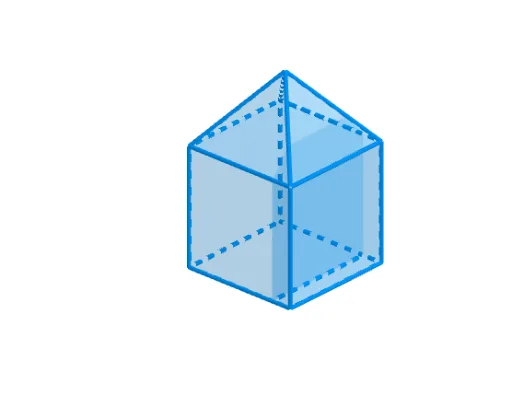
This example demonstrates the geometric relationship and spatial distribution between a cube and a tetrahedron slice. It involves core mathematical concepts such as solid geometry, geometric construction, and spatial geometric transformations. The construction utilizes commands and objects like Rotate, Angle, Circle, Line, OrthogonalLine, Intersect, Prism, Midpoint, and Polygon in GeoGebra. Suitable for high school and above students learning solid geometry, spatial visualization, and geometric construction.
GeoGebra Commands & Parameters
Rotate(D, α, C) → D'Angle(D, C, D') → βCircle(C, n - s) → cCircle(D', n - s) → dLine(C, D') → fOrthogonalLine(C, f) → gOrthogonalLine(D', f) → iIntersect(c, g) → E, FIntersect(d, i) → G, HPrism(Polygon[A, B, C, D], n) → a, I, edgeAI, edgeBJ, edgeCK, edgeDL, edgeIJ, edgeJK, edgeKL, edgeIL, J, K, L, faceABJI, faceBCKJ, faceCDLK, faceADLI, faceIJKLPrism(Polygon[C, D', H, F], n) → b, M, edgeCM, edgeD'N, edgeHO, edgeFP, edgeMN, edgeNO, edgeOP, edgeMP, N, O, P, faceCD'NM, faceD'HON, faceFHOP, faceCFPM, faceMNOPMidpoint(edgeKL) → QMidpoint(edgeMN) → SLine(M, U) → jLine(N, U) → kLine(T, edgeMN) → lIntersect(l, k) → VIntersect(j, l) → WMidpoint((n / 2, 0, n), (n / 2, n, n)) → RLine(A_1, Z) → mLine(B_1, Z) → pLine(C_1, edgeKL) → qIntersect(p, q) → D_1Intersect(m, q) → E_1Polygon(J, G_1, Z) → t1, z_1, j_1, g_1Polygon(J, I, Z) → t2, z_2, j_2, i_1Polygon(I, F_1, Z) → t3, z_3, i_2, f_1Polygon(G_1, M, D_1, Z) → q1, g_2, m_1, d_1, z_4Polygon(Z, D_1, E_1) → t4, e_1, z_5, d_2Polygon(F_1, L, E_1, Z) → q2, f_2, l_1, e_2, z_6Polygon(L, M, D_1, E_1) → q3, l_2, m_2, d_3, e_3Polygon(P, M, W) → t5, w, p_1, m_3Polygon(P, O, V, W) → q4, p_2, o, v, w_1Polygon(O, V, N) → t6, n_1, o_1, v_1Polygon(M, W, V, N) → q5, m_4, w_2, v_2, n_2Polygon(C, D, L, E_1, D_1, M) → poly1, c_1, d_4, l_3, e_4, d_5, m_5Polygon(C, D', N, V, W, M) → poly2, c_2, d', n_3, v_3, w_3, m_6
AI Drawing Prompt Reference
Draw a cube and a tetrahedron slice to demonstrate their geometric relationship and spatial distribution. The cube and tetrahedron slice partially overlap, with intersections formed by rotating and constructing orthogonal lines. Use these intersection points to generate multiple polygonal faces. First, create the basic shapes of the cube and tetrahedron slice, then find their intersections, and finally fill the intersection area with polygonal faces to create a clear 3D effect.
The prompt above was compiled from the original drawing commands and is for reference only.