
Cross Sections of a Cylinder by Steve Phelps
Loading the math board and drawing, please wait…
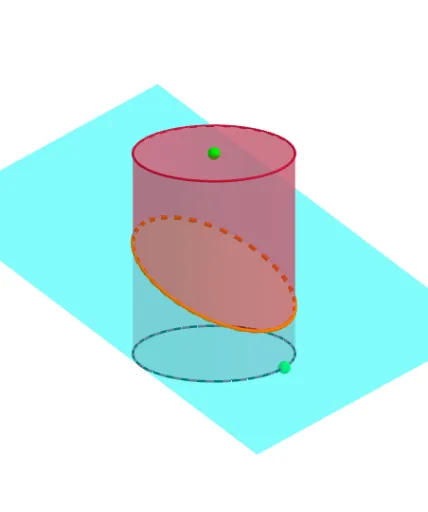
This example demonstrates the cross-sectional shapes of a cylinder. Key mathematical concepts include solid geometry and geometric construction. Using GeoGebra commands such as Point, Circle, Intersect, Translate, etc., it dynamically shows different cross-sectional shapes. Suitable for middle school and above students to learn solid geometry.
GeoGebra Commands & Parameters
Point(xAxis) → APoint(zAxis) → BCircle(zAxis, A) → cIntersect(yAxis, zAxis) → CCylinder(C, B, x(A)) → a, d, e, bTranslate(Rotate[Rotate[Plane[(0, 1, 0), xAxis], tilt, xAxis], turn, zAxis], Vector[(0, 0, shift)]) → fIntersectPath(f, a) → gCorner(g) → D, E, F, G
AI Drawing Prompt Reference
Draw a cylinder and show its cross-sectional shapes, including circles and ellipses. Start by plotting the coordinate axes and creating a point on one axis, then draw a circle centered at this point. Find the intersection of the axes and use this point to construct the cylinder. Next, rotate a plane around an axis at a certain angle and translate it along the axis to get an inclined cross-section. Finally, calculate the intersection of the inclined plane with the cylinder and mark the corner points at the intersection to demonstrate the formation of different cross-sectional shapes.
The prompt above was compiled from the original drawing commands and is for reference only.