
Creating Distances in the Coordinate Plane: Formative Assessment with Feedback
Loading the math board and drawing, please wait…
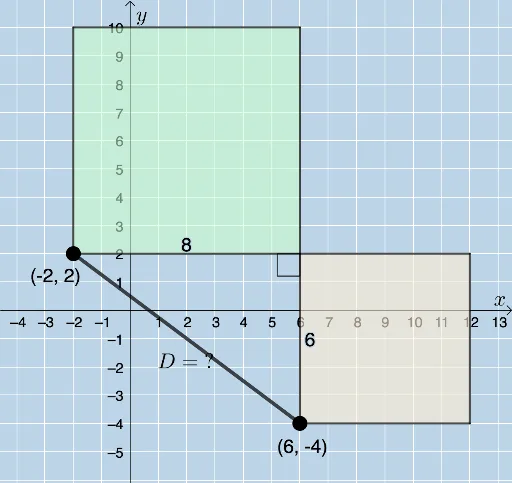
This example demonstrates how to create distances in the coordinate plane and provides formative assessment with feedback. Core math concepts include the Pythagorean Theorem, right triangles, and coordinate geometry. Construction highlights the use of GeoGebra commands like RandomElement, Segment, Polygon, and Angle. Suitable for high school students learning distance calculations and geometric constructions.
GeoGebra Commands & Parameters
RandomElement(l1) → aSegment(A, B) → fPolygon(A, C, B) → t1_1, b, a_1, cSegment(A, C) → gSegment(C, B) → hAngle(B, C, A) → αPolygon(B, C, 4) → poly1, i, j, k, l, D, EPolygon(C, A, 4) → poly2, m, n, p, q, F, GSegment(A, F) → rSegment(F, G) → sSegment(G, C) → tSegment(C, D) → eSegment(D, E) → f_1Segment(E, B) → g_1
AI Drawing Prompt Reference
Draw a random triangle ABC in the coordinate plane and connect the vertices to form a closed shape. Then, create a quadrilateral BCE based on side BC and another quadrilateral CFA based on side AC. Finally, connect the vertices of these quadrilaterals with line segments to display the geometric construction process, highlighting key angles and shapes.
The prompt above was compiled from the original drawing commands and is for reference only.