
Counting Squares in Parallelograms by Tim Brzezinski
Loading the math board and drawing, please wait…
In collections
Parallelograms: Counting Squares
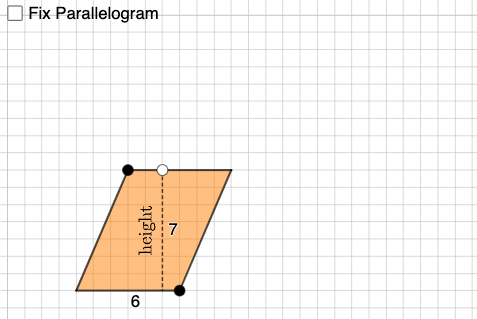
This example demonstrates how to count squares within a parallelogram to explore its properties. Key mathematical concepts include geometric construction, matrices, and combinatorics. Using GeoGebra commands such as Point, Segment, and Polygon, one can construct a parallelogram and calculate the number of squares inside it. Suitable for middle school and above students learning geometry and combinatorics.
GeoGebra Commands & Parameters
Point(xAxis) → APoint(Ray[(0, 0), (1, 0)]) → BPointIn(x ≥ 0 ∧ y ≥ 0 ∧ x ≤ x(B)) → CSegment(C, D) → fIntersect(eq1, f) → ESegment(C, E) → gPoint(g) → FCircle(H, Distance[A, G]) → ePoint(e) → ILine(H, I) → hOrthogonalLine(I, h) → iCircle(I, Distance[G, F]) → kIntersect(k, i, 2) → JLine(J, h) → jCircle(J, Distance[F, C]) → pIntersect(p, j, 1) → KPolygon(H, I, J, K) → q3, h_1, i_1, j_1, k_1Circle(L, Distance[G, B]) → qPoint(q) → MLine(L, M) → lOrthogonalLine(L, l) → mCircle(L, Distance[G, F]) → rIntersect(r, m, 2) → NLine(N, l) → nCircle(N, Distance[F, D]) → sIntersect(s, n, 2) → OPolygon(L, M, O, N) → q4, l_1, m_1, o, n_1Intersect(xAxis, yAxis) → PSegment(P, C) → tSegment(C, D) → p_1Segment(D, B) → q_1Segment(B, P) → r_1Intersect(t, r_1) → QPolygon(Q, B, D, C) → q1, q_2, b, d, cSegment(F, G) → aRotateText(text1, pi / 2) → text2Circle(R, a) → c_1Point(c_1) → SLine(R, S) → f_1OrthogonalLine(R, f_1) → g_1Circle(R, Distance[F, D]) → d_1Intersect(d_1, g_1, 2) → TPolygon(S, R, T) → t1, t_1, s_1, r_2
AI Drawing Prompt Reference
On a coordinate plane, start from the origin and set a reference direction to define a parallelogram region. Construct several auxiliary points on/near its sides, then create perpendicular lines and use intersections with circles whose radii are given by distance measures between key points. The intersection points become additional vertices; connect the relevant points with line segments in order to form an outer quadrilateral and an inner polygonal shape. Keep the coordinate-axis intersection as a reference. Arrange all these elements so the final drawing highlights a grid-like setup inside the parallelogram for counting squares.
The prompt above was compiled from the original drawing commands and is for reference only.