
Transformation Matrix
Loading the math board and drawing, please wait…
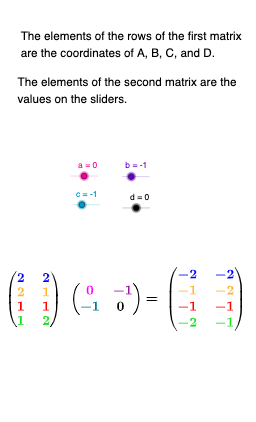
This example demonstrates how transformation matrices operate on polygons, visually illustrating geometric transformations. Key math concepts include matrices, matrix multiplication, and geometric transformations. Construction highlights involve GeoGebra commands like Polygon for creating shapes, and objects such as a, b, c, d for vertices, S, A, B, C, D for original and transformed figures, a_{1}, a_{2}, b_{1}, b_{2}, c_{1}, c_{2}, d_{1}, d_{2} for transformed vertices, M for the transformation matrix, and auxiliary objects like q1, d_3, c_3, b_3, a_3, m1, A', B', C', D', q2, d', a', b', c', ap1, ap2, bp1, bp2, cp1, cp2, dp1. Suitable for high school mathematics and introductory linear algebra, this tool helps students grasp the intuitive effects of matrix transformations.
GeoGebra Commands & Parameters
Polygon(D, C, B, A) → q1, d_3, c_3, b_3, a_3Polygon(D', A', B', C') → q2, d', a', b', c'
AI Drawing Prompt Reference
Draw a visual示示 of a polygon transformation using two corresponding quadrilaterals. First, select four vertices in order and connect them to form the original closed quadrilateral shape (associated with the original figure). Next, choose four corresponding transformed vertices and connect them in the same order to form a second closed quadrilateral, clearly distinguishing the transformed figure from the original. Emphasize the intuitive relationship between the original and transformed polygons through their vertex correspondence, constructed first for the original shape and then for the transformed one.
The prompt above was compiled from the original drawing commands and is for reference only.