
Cosine Rule - Find a Side
Loading the math board and drawing, please wait…
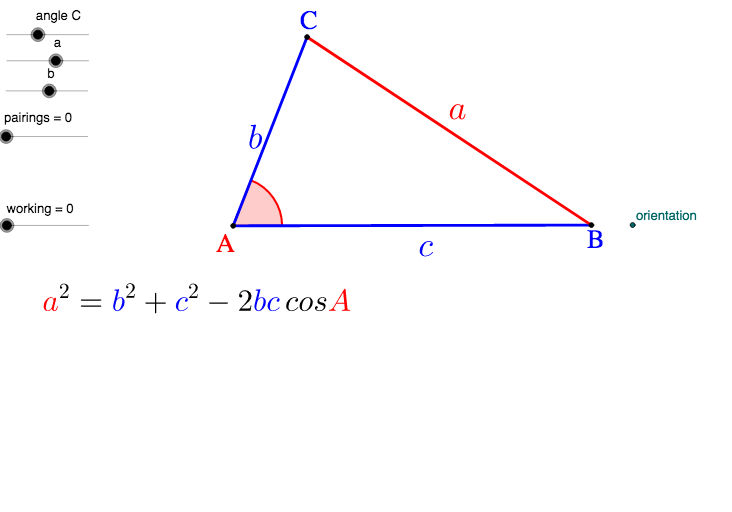
This example demonstrates how to use the cosine rule to find the length of a side in a triangle. Key mathematical concepts include trigonometry and the cosine rule. Using GeoGebra commands such as Line, Circle, Intersect, etc., a triangle is constructed and the side length is calculated. Suitable for middle school and above students to learn trigonometry and geometric construction.
GeoGebra Commands & Parameters
Line(R, orientation) → zCircle(R, QR) → vIntersect(v, z) → P'', QRotate(Q, angleR°, R) → P'Angle(Q, R, P') → ρLine(P', R) → wCircle(R, PR) → uSegment(R, Q) → pIntersect(u, w) → P, P'''Segment(R, P) → qSegment(P, Q) → rRotate(Q, 180° - angleR°, R) → Q'Midpoint(P, Q) → M_1Midpoint(R, P) → M_2Midpoint(R, Q) → M_3Vector(R, M_1) → cVector(Q, M_2) → aVector(P, M_3) → bMidpoint(M_2, R) → M''_2Midpoint(M_3, R) → M''_3Midpoint(M''_2, M''_3) → M_4Distance(P, Q) → PQ
AI Drawing Prompt Reference
Draw a triangle with one side known, and another side determined by rotation and intersection. Use circles and lines to construct the triangle, and calculate the rotation angle. Mark key points and midpoints, draw vectors and medians, and finally display the triangle with auxiliary lines.
The prompt above was compiled from the original drawing commands and is for reference only.