
Area Between Curves via IntegralBetween
Loading the math board and drawing, please wait…
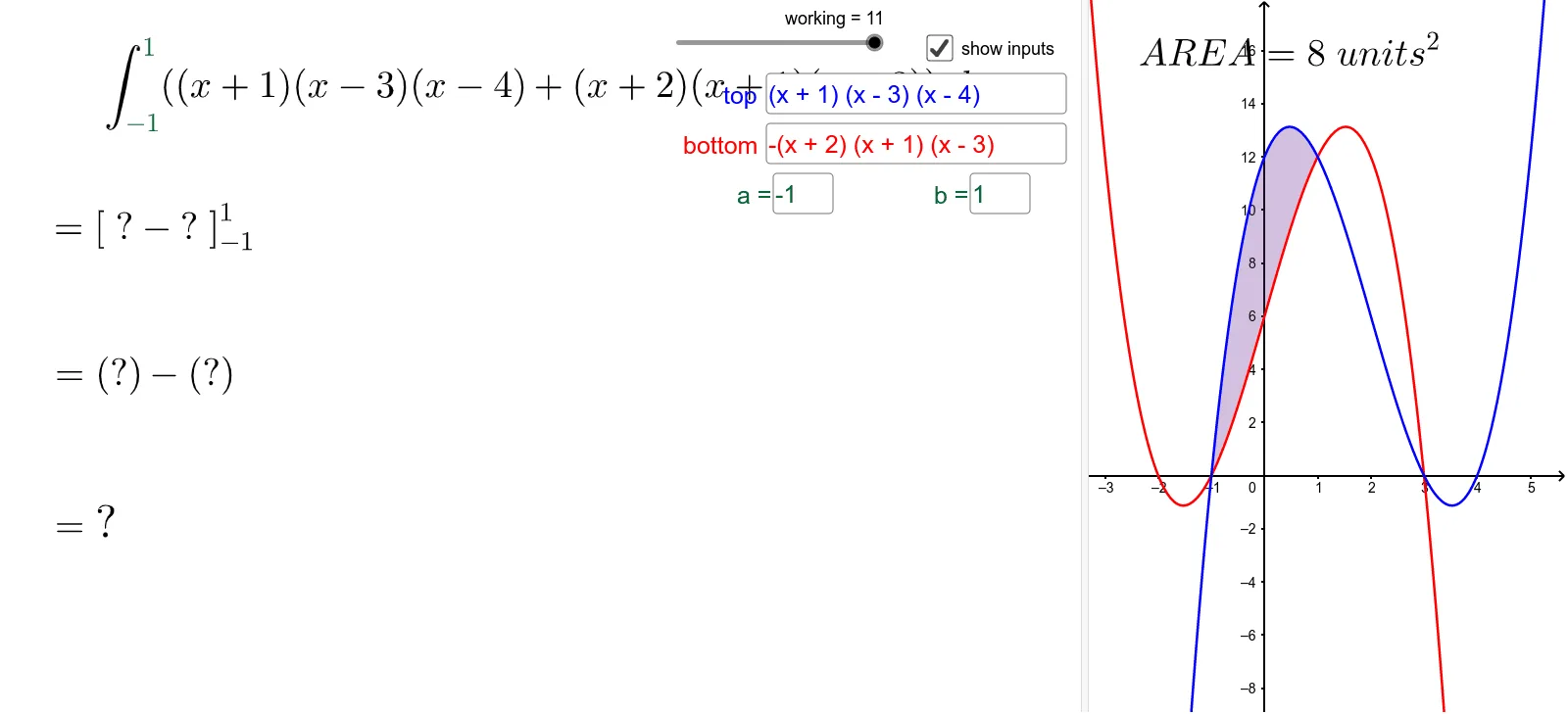
This example visualizes the region enclosed by two functions over a chosen interval [a, b] and computes its area directly using GeoGebra’s integral tools. It demonstrates the geometric meaning of the definite integral as “area between curves”: for upper and lower functions f(x) and g(x), the area on [a, b] is given by ∫(upper − lower) dx. The construction uses function/parameter input fields (Textfield with objects such as g, f, InputBox1–InputBox4, and various text labels) to let users define the curves and the integration limits a and b, while geometric elements (line segments and auxiliary points/values like c, h, d) help highlight the interval boundaries. The key computation is performed with IntegralBetween (and Integral), producing the numeric/visual area for the selected configuration. Suitable for high-school advanced topics and early calculus courses, especially for teaching definite integrals, graph interpretation, and area-between-curves reasoning.
GeoGebra Commands & Parameters
Textfield(f) → InputBox1Textfield(g) → InputBox2IntegralBetween(f, g, a, b) → cIntegral(f(x) - g(x)) → hTextfield(a) → InputBox3Textfield(b) → InputBox4
AI Drawing Prompt Reference
Draw the region between two functions f(x) and g(x) within the interval [a, b] and calculate its area. First, input the expressions for f(x) and g(x), then input the endpoints a and b. Based on the inputs, plot the two curves, mark the interval [a, b], and compute and display the area between the two curves within this interval.
The prompt above was compiled from the original drawing commands and is for reference only.