
Classroom Arcs Construction: Build Circle Arcs via Geometric Transforms
Loading the math board and drawing, please wait…
In collections
geometriadinamica.es
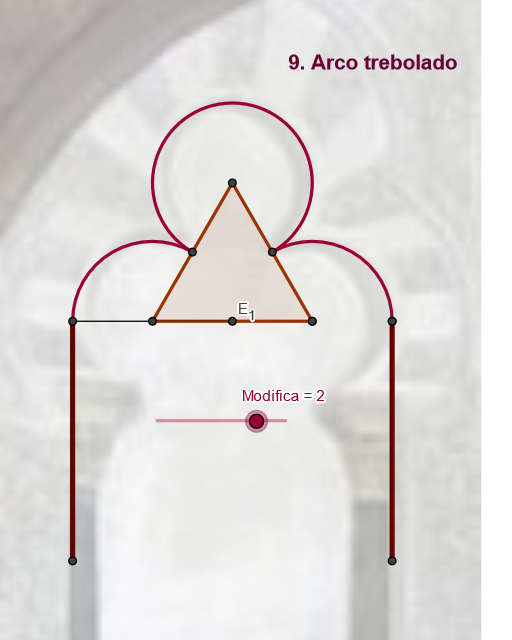
This example demonstrates how to construct and manipulate circle arcs (arcs) in a dynamic geometry environment, using circle geometry (centers/endpoints) together with geometric transformations to visualize how an arc segment changes under rotation, reflection, and translation. Key mathematical ideas include arc construction (Arc), circle geometry, and constructing auxiliary elements such as lines, segments, and perpendiculars to determine arc endpoints and constraints. Construction highlights from the provided GeoGebra commands/objects: Midpoint for key reference points; If for conditional choices; Intersect to find intersection points that guide the arc; Segment/Line/OrthogonalLine to build sides and perpendicular relationships; Circle plus CircumcircleArc / CircleArc / Arc to generate the required arcs; and Rotate / Mirror / Translate to reposition arcs under transformations, with Vector optionally indicating direction-related information. Suitable for classroom geometry (middle and high school) and also for introductory college-level geometry/algorithmic construction demonstrations.
GeoGebra Commands & Parameters
Midpoint(C, D) → FMidpoint(F, C) → RMidpoint(R, F) → VIf(zz < 0, 10, zz) → jSegment(V, S1) → g_2Segment(D, B) → eLine(F, e) → kMidpoint(C, D) → ESegment(A, C) → dRotate(C, 359.91000000000014°, E) → C''CircumcircleArc(C, C'', S1) → gSegment(C, F) → rMirror(D, k) → D'_1Segment(R, S1) → fSegment(R, S1) → n_1OrthogonalLine(S1, g_2) → s_1Intersect(k, s_1) → SSegment(S1, S) → t_1Circle(S1, (Distance[S1, S] * (c - 5) / 3)) → c_2Intersect(c_2, s_1) → T, USegment(S1, T) → a_2Mirror(C, k) → C'Mirror(C'', k) → C'''Mirror(S1, k) → S1'CircumcircleArc(C', C''', S1') → g'Mirror(S1, k) → S1'_1Mirror(T, k) → T'Segment(S1'_1, T') → b_2Mirror(S1, k) → S1'_2Mirror(S, k) → S'Segment(S1'_2, S') → d_2Mirror(R, k) → R'Mirror(S1, k) → S1'_3Segment(R', S1'_3) → f'Circle(V, C) → e_2Mirror(C, k) → C'_3Mirror(S1, k) → S1'_4Mirror(V, k) → V'Midpoint(R, C) → WCircle(C, V) → h_2Intersect(e_2, h_2, 2) → ZPolygon(C, Z, V) → poly1, v, c_3, zMirror(C, k) → C'_4Mirror(Z, k) → Z'Mirror(V, k) → V'_1Polygon(C'_4, Z', V'_1) → poly1', v'_1, c'_4, z'Circle(C, i) → hIntersect(h, r, 1) → GMirror(G, k) → G'Circle(G, G') → pIntersect(p, k, 1) → HPolygon(G, H, G') → poly2, g'_1, g_1, h_1Rotate(C, Max[-2.09, (((-(j - 2)) * 3.14) * 2 / 9)], G) → C'_1Rotate(C'_1, (-Min[5.24, ((j - 5) * 5.24 / 3)]), H) → ISegment(I, H) → lCircleArc(H, I, C'_1) → qSegment(C'_1, G) → sCircleArc(G, C'_1, C) → tMirror(G, k) → G'_1Mirror(C'_1, k) → JMirror(C, k) → C'_2Arc(Mirror[Circle[G, C'_1], k], J, C'_2) → t'Mirror(C'_1, k) → KMirror(G, k) → G'_2Segment(K, G'_2) → s'Midpoint(C, D) → LSegment(C, L) → a_1Circle(C, m) → c_1Intersect(c_1, a_1, 1) → MLine(M, k) → b_1Circle(M, C) → d_1Intersect(d_1, b_1, 1) → NOrthogonalLine(N, k) → e_1Intersect(k, e_1) → OCircle(N, O) → f_1Intersect(f_1, b_1, 1) → PIntersect(c_1, e_1, 1) → QRotate(C, Min[1.57, ((n - 2) * 1.57 / 2)], Q) → C'_5Rotate(N, Min[1.57, ((n - 5) * 1.57 / 3)], P) → N'CircleArc(Q, C, C'_5) → k_1Segment(Q, C'_5) → i_1CircleArc(P, N, N') → p_1Segment(P, N') → j_1Mirror(P, k) → P'Mirror(N, k) → N'_1Mirror(N', k) → N''Arc(Mirror[Circle[P, N], k], N'_1, N'') → q_1Mirror(Q, k) → Q'Mirror(C, k) → C'_6Mirror(C'_5, k) → A_1Arc(Mirror[Circle[Q, C], k], C'_6, A_1) → r_1Mirror(P, k) → P'_1Mirror(N', k) → N''_1Segment(P'_1, N''_1) → l_1Mirror(Q, k) → Q'_1Mirror(C'_5, k) → B_1Segment(Q'_1, B_1) → m_1Segment(T2, T1) → f_2Mirror(D, f_2) → D'Mirror(B, f_2) → B'Segment(D', B') → e'Mirror(A, f_2) → A'Mirror(C, f_2) → C'_7Segment(A', C'_7) → d'Vector(A, B') → u_1Translate(pic1, u_1) → pic1'Translate(pic1, u_1) → pic1'_1Midpoint(C, D) → D_1Midpoint(D', C'_7) → E_1Segment(D', E_1) → i_2Distance(D', E_1) → distanciaD'E1Circle(D', Modifica) → k_2Intersect(k_2, i_2) → G_1, N_1Mirror(G_1, E_1) → H_1Polygon(G_1, H_1, 3) → poly3, j_2, l_2, m_2, I_1Circle(G_1, D') → p_2Intersect(p_2, m_2) → K_1, O_1CircleArc(G_1, K_1, D') → q_2Line(E_1, e') → n_2Mirror(G_1, n_2) → L_1Mirror(K_1, n_2) → M_1Mirror(D', n_2) → D''Arc(Mirror[Circle[G_1, K_1], n_2], M_1, D'') → r_2CircleArc(I_1, M_1, K_1) → s_2
AI Drawing Prompt Reference
Draw a series of circle arcs in a geometric figure. These arcs are constructed using circle geometry and auxiliary elements such as line segments, lines, and perpendiculars. The construction process first determines the endpoints and constraints of the arcs, then uses transformations like rotation, reflection, and translation to show how the arcs change in different positions. The figure includes multiple arcs, circles, line segments, and lines, demonstrating the impact of geometric transformations on the shape of the arcs.
The prompt above was compiled from the original drawing commands and is for reference only.