
Copying an Angle and Rotations
Loading the math board and drawing, please wait…
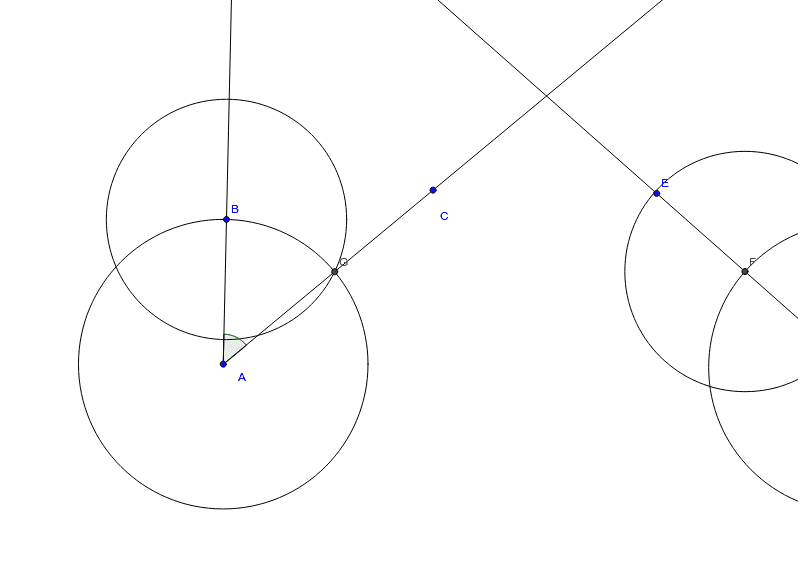
This example demonstrates how constructing a copy of an angle relates to rotating a point around another point, involving core concepts like angles, rotations, and geometric transformations. It uses commands such as Ray, Angle, Circle, and Intersect in GeoGebra. Suitable for high school students learning geometric transformations.
GeoGebra Commands & Parameters
Ray(A, B) → aRay(A, C) → bAngle(b, a) → αRay(D, E) → cCircle(A, B) → dCircle(D, Radius[d]) → eIntersect(e, c, 1) → FIntersect(d, b, 1) → GCircle(F, Segment[B, G]) → fIntersect(e, f, 2) → HRay(D, H) → gCircle(B, Segment[B, G]) → h
AI Drawing Prompt Reference
Draw a copy of an angle and rotate a point around another point. First, draw two rays AB and AC to form angle α. Then, draw ray DE from point D. Next, draw a circle centered at A and another circle centered at D with the same radius. Find the intersection points F and G of these two circles. Draw a circle centered at B with radius BG, and find its other intersection point H with the circle centered at D. Finally, draw ray DH.
The prompt above was compiled from the original drawing commands and is for reference only.