
Copy a Shape
Loading the math board and drawing, please wait…
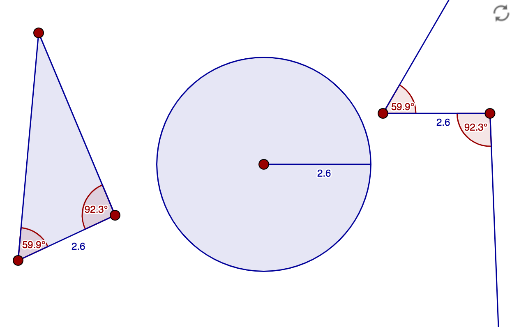
This example demonstrates how to copy a given shape using GeoGebra. The core concepts include geometric transformations, specifically copying. Commands like Polygon, Point, Segment are used to precisely copy the shape. Suitable for middle school and above students learning geometric transformations.
GeoGebra Commands & Parameters
Polygon(A, B, C) → poly1, c, a, bPoint(Circle[D, c]) → ESegment(D, E) → dAngle(C, B, A) → αAngle(B, A, C) → βRotate(E, β, D) → E'Angle(E, D, E') → γRay(D, E') → eRotate(D, α, E) → D'Angle(D, E, D') → δRay(E, D') → fCircle(F, c) → gLine(F, xAxis) → hIntersect(g, h, 2) → GSegment(F, G) → i
AI Drawing Prompt Reference
Draw a triangle ABC, then take point E on circle D, connect DE, measure angles ABC and ACB, rotate E around angle ACB to get E', draw ray DE', then rotate D around angle ABC to get D', draw ray ED', next draw a circle with center C, intersect it with the x-axis at G, and draw line segment FG.
The prompt above was compiled from the original drawing commands and is for reference only.