
Convex Surface 1: Intersection of Parabola and Linear Functions
Loading the math board and drawing, please wait…
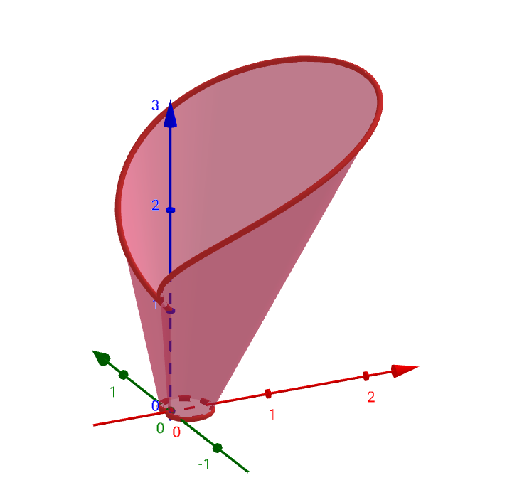
This example demonstrates constructing a convex surface in GeoGebra and analyzing its intersection with linear functions. Key mathematical concepts include surface geometry, function graph intersections, and parametric construction. The construction involves using CurveCartesian to create surface objects and combining them with linear functions for geometric analysis. Suitable for high school students or college undergraduates learning the integration of solid geometry and function graphing.
GeoGebra Commands & Parameters
CurveCartesian(((0.2 + (0.2 * cos(t))) * cos(t)), ((0.2 + (0.2 * cos(t))) * sin(t)), 0, t, 0, (2 * π)) → aCurveCartesian(((1 + cos(t)) * cos(t)), ((1 + cos(t)) * sin(t)), 2 + cos(t), t, 0, (2 * π)) → bSurface((k * a(t)) + ((1 - k) * b(t)), t, 0, (2 * π), k, 0, 1) → c
AI Drawing Prompt Reference
Create a 3D convex surface formed by linear interpolation between two closed curves. The first curve is a heart-shaped loop lying in the horizontal plane, and the second is a spatial heart-shaped curve with varying height. Connect these two curves with a smooth surface to form a tent-like or petal-like solid. Additionally, include a linear function plane intersecting the surface, clearly showing the intersection curve to illustrate the geometric relationship. The overall view should highlight the convexity of the surface and the position of the intersection.
The prompt above was compiled from the original drawing commands and is for reference only.