
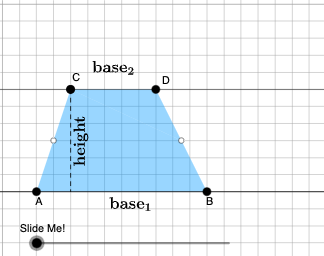
Construction of Isosceles Trapezoid and Equilateral Triangle
Loading the math board and drawing, please wait…
In collections
Area of a Trapezoid: Intuitive Discovery
This example demonstrates the construction of an isosceles trapezoid and an equilateral triangle using GeoGebra. Key mathematical concepts include geometry, polygons, isosceles trapezoid, and equilateral triangle. Commands such as Point, Polygon, OrthogonalLine, Intersect, Dilate, and Rotate are used to construct and transform the shapes. Suitable for students at the junior high school level and above for geometric construction learning.
GeoGebra Commands & Parameters
Point(Ray[A, A + (1, 0)]) → BPointIn(d) → CPolygon(A, B, C) → t1, f, a, bOrthogonalLine(C, g) → hIntersect(g, h) → C_{1}Point(Ray[C, C + (1, 0)]) → DDilate(C, If[0 < c ≤ 1, 1 - c, 0], D) → F'Dilate(D, If[1 < c ≤ 2, 2 - c, 0], C_{1}) → D'Rotate(C, If[2 < c ≤ 3, ((c - 2) * pi), pi], D) → F'_{1}Rotate(F', If[2 < c ≤ 3, ((c - 2) * pi), pi], D) → F''Angle(C, B, A) → βAngle(B, A, C) → γIf(γ ≟ pi / 2, 12, 16) → oMidpoint(B, D) → EPolygon(A, B, E, C) → q1, a_1, b_1, e, c_1Polygon(E, D, C) → t2, c_2, e_1, d_1Dilate(D, If[0 < c ≤ 1, 1 - c, 0], E) → D'_{1}Segment(D, D'_{1}) → iRotate(D, If[1 < c ≤ 2, ((-(c - 1)) * pi), (-pi)], E) → D'_{2}Rotate(D'_{1}, If[1 < c ≤ 2, ((c - 1) * pi), pi], E) → FSegment(D'_{2}, F) → i'Segment(C, D) → jSegment(A, C) → kDilate(C, If[2 < c ≤ 3, 3 - c, 0], E) → C'Segment(C, C') → lRotate(E, If[4 < c ≤ 5, ((-(c - 4)) * pi), (-pi)], E) → E'Rotate(D, If[4 < c ≤ 5, ((-(c - 4)) * pi), (-pi)], E) → D'_{3}Rotate(C, If[4 < c ≤ 5, ((-(c - 4)) * pi), (-pi)], E) → C'_{1}Polygon(E', D'_{3}, C'_{1}) → t2', c'_{1}, e', d'_{3}Segment(C'_{1}, D'_{3}) → mSegment(D'_{3}, E) → nSegment(C'_{1}, E) → pAngle(E, C'_{1}, D'_{3}) → αOrthogonalLine(C, g) → qIntersect(g, q) → GMidpoint(C, G) → HDilate(C, If[6 < c ≤ 7, 7 - c, 0], H) → C'_{2}Segment(C, C'_{2}) → rDilate(H, If[7 < c ≤ 8, 8 - c, 0], G) → H'Segment(H, H') → sRotate(C, If[8 < c ≤ 9, ((-(c - 8)) * pi), (-pi)], H) → C'_{3}Rotate(C'_{2}, If[8 < c ≤ 9, ((-(c - 8)) * pi), (-pi)], H) → ISegment(C'_{3}, I) → r'Midpoint(k) → JDilate(E, If[9 < c ≤ 10, 10 - c, 0], H) → E'_{1}Dilate(J, If[9 < c ≤ 10, 10 - c, 0], H) → J'Segment(J, J') → tSegment(E, E'_{1}) → f_1Polygon(A, C'_{1}, E, J) → q2, a_2, g_1, e_2, j_1Polygon(E, C, J) → t3, j_2, e_3, c_3Rotate(E, If[11 < c ≤ 12, ((-(c - 11)) * pi), (-pi)], E) → E'_{2}Rotate(C, If[11 < c ≤ 12, ((-(c - 11)) * pi), (-pi)], E) → C'_{4}Rotate(J, If[11 < c ≤ 12, ((-(c - 11)) * pi), (-pi)], E) → J'_{1}Polygon(E'_{2}, C'_{4}, J'_{1}) → t3', j'_{1}, e'_{2}, c'_{4}Segment(J'_{1}, C'_{4}) → h_1Segment(C'_{4}, E) → i_1Segment(E, J'_{1}) → k_1Segment(A, J) → l_1Segment(J, C) → m_1OrthogonalLine(C'_{1}, g) → n_1Intersect(n_1, p_1) → KOrthogonalLine(J'_{1}, g) → q_1Intersect(q_1, g) → LDilate(J'_{1}, If[13 < c ≤ 14, 14 - c, 0], L) → MSegment(J'_{1}, M) → r_1Dilate(C'_{1}, If[13 < c ≤ 14, 14 - c, 0], K) → NSegment(C'_{1}, N) → s_1Polygon(A, L, J'_{1}, J) → q3, a_3, l_2, t_1, j_3Polygon(L, C'_{1}, J'_{1}) → t4, f_2, l_3, g_2Dilate(J'_{1}, If[15 < c ≤ 16, 16 - c, 0], J) → OVector(J'_{1}, O) → uTranslate(L, u) → L'Translate(C'_{1}, u) → PTranslate(J'_{1}, u) → QPolygon(L', P, Q) → t4', q_2, l', p_2Segment(P, O) → h_2Segment(O, L') → i_2Polygon(A, C'_{1}, K, J) → q4, a_4, k_2, k_3, j_4Polygon(C'_{1}, J'_{1}, K) → t5, k_4, m_2, n_2Translate(C'_{1}, u) → RTranslate(J'_{1}, u) → STranslate(K, u) → K'Polygon(R, S, K') → t5', k', r_2, s_2Segment(R, Q) → t_2Segment(R, K') → b_2Point(f_3) → TIntersect(eq1, Line[A, B]) → USegment(T, U) → d_2Midpoint(A, B) → VMidpoint(C, D) → WRotateText(text2, pi / 2) → text4Midpoint(D'_{3}, C'_{1}) → ZRotateText(text3, (-((pi * (c - 5))))) → text5
AI Drawing Prompt Reference
Draw an isosceles trapezoid and an equilateral triangle to demonstrate geometric construction. Start by creating an isosceles trapezoid with parallel bases and equal legs, then construct an equilateral triangle on one side. Ensure the trapezoid's legs are equal and the triangle's sides are equal. Show how the diagonals of the trapezoid intersect at the height of the triangle and use rotations and dilations to form the shapes.
The prompt above was compiled from the original drawing commands and is for reference only.