
Constructing and Transforming Sine Curves in GeoGebra
Loading the math board and drawing, please wait…
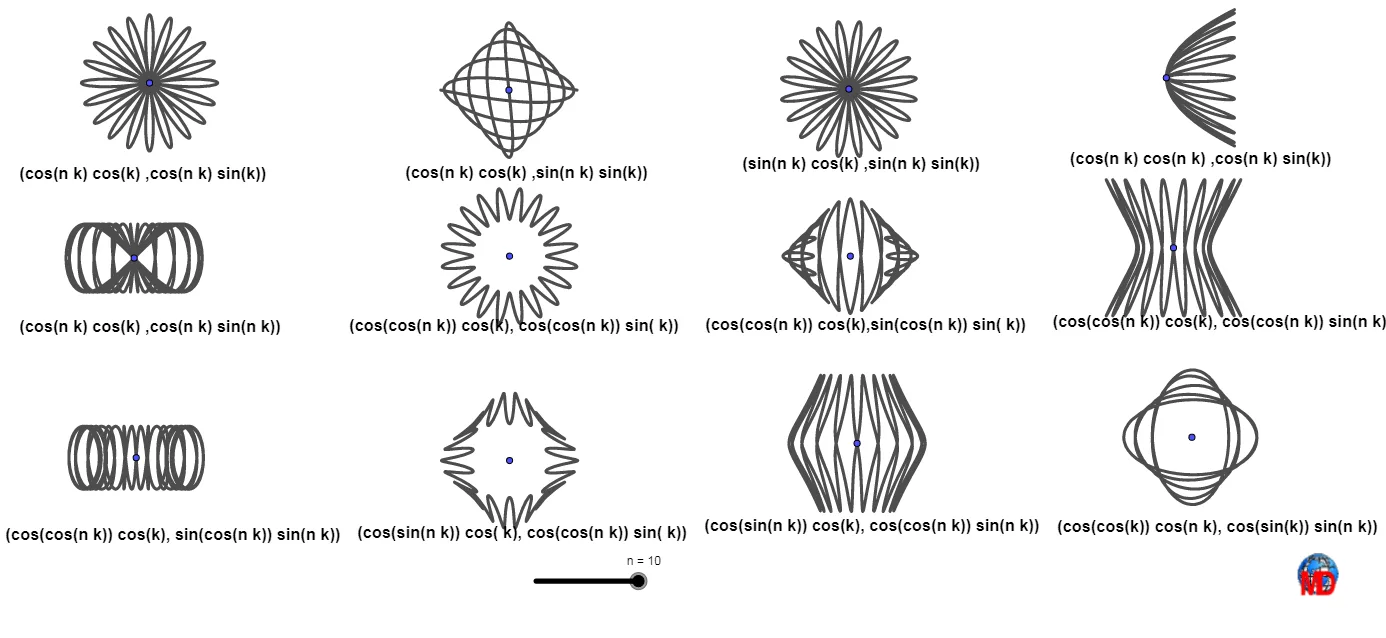
This example demonstrates how to construct and visualize sine curves in the Cartesian plane, highlighting relationships created by combining or subtracting curve components. The key math concepts include trigonometry (the sine function), graphing of parametric/constructed curves, and the use of arithmetic operations and geometric relationships to obtain transformed curve shapes. In the GeoGebra setup, the primary drawing mechanism is CurveCartesian to render the curve(s) from parameter-defined expressions. A collection of geometric points (e.g., A, B, C, D, E, F, G, H, I, J, K, M) serves as anchors for parameters or intermediate values, while multiple text objects (texte1–texte12) and an embedded image (image1) are used to label equations, parameter meanings, and the intended construction workflow. Suitable for secondary school through early university, the activity supports lessons on trigonometric functions, curve sketching/graphing, and understanding how algebraic expressions generate geometric curves.
GeoGebra Commands & Parameters
CurveCartesian(x(A) + (cos((n * k)) * cos(k)), y(A) + (cos((n * k)) * sin(k)), k, 0, (L * π)) → aCurveCartesian(x(B) + (cos((n * k)) * cos(k)), y(B) + (sin((n * k)) * sin(k)), k, 0, (L * π)) → bCurveCartesian(x(C) + (sin((n * k)) * cos(k)), y(C) + (sin((n * k)) * sin(k)), k, 0, (L * π)) → cCurveCartesian(x(E) + (cos((n * k)) * cos((n * k))), y(E) + (cos((n * k)) * sin(k)), k, 0, (L * π)) → dCurveCartesian(x(F) + (cos((n * k)) * cos(k)), y(F) + (cos((n * k)) * sin((n * k))), k, 0, (L * π)) → eCurveCartesian(x(D) + (cos(cos((n * k))) * cos(k)), y(D) + (sin(cos((n * k))) * sin(k)), k, 0, (L * π)) → gCurveCartesian(x(G) + (cos(cos((n * k))) * cos(k)), y(G) + (cos(cos((n * k))) * sin(k)), k, 0, (L * π)) → fCurveCartesian(x(H) + (cos(cos((n * k))) * cos(k)), y(H) + (cos(cos((n * k))) * sin((n * k))), k, 0, (L * π)) → hCurveCartesian(x(I) + (cos(cos((n * k))) * cos(k)), y(I) + (sin(cos((n * k))) * sin((n * k))), k, 0, (L * π)) → iCurveCartesian(x(J) + (cos(sin((n * k))) * cos(k)), y(J) + (cos(cos((n * k))) * sin(k)), k, 0, (L * π)) → jCurveCartesian(x(K) + (cos(sin((n * k))) * cos(k)), y(K) + (cos(cos((n * k))) * sin((n * k))), k, 0, (L * π)) → kCurveCartesian(x(M) + (cos(cos(k)) * cos((n * k))), y(M) + (cos(sin(k)) * sin((n * k))), k, 0, (L * π)) → l
AI Drawing Prompt Reference
In the Cartesian plane, draw a family of curves centered at several fixed points)Skip. Each curve is generated by parametric equations combining trigonometric functions, with x and y coordinates offset by expressions involving cosine and sine of nested angles. The curves form petal-like or spiral shapes, varying in frequency and nesting. They are distributed around different anchor points, with the parameter ranging from zero to a multiple of pi. Text labels accompany the curves to indicate their mathematical forms and parameter meanings, illustrating a collection of interrelated sine-based transformations.
The prompt above was compiled from the original drawing commands and is for reference only.