
Construct Congruent Triangles Given Parts
Loading the math board and drawing, please wait…
In collections
Triangle Congruence
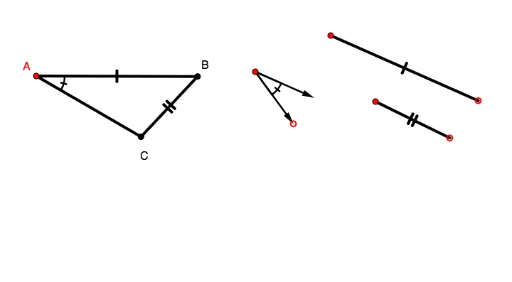
This example allows students to attempt constructing congruent triangles given parts of a triangle. The core mathematical concepts include the properties of congruent triangles. Using GeoGebra commands such as Circle, Point, Ray, Rotate, Intersect, Segment, Angle, Vector, etc., students can understand how to use these geometric elements for construction. Suitable for middle school and above students to learn about the properties and construction of congruent triangles.
GeoGebra Commands & Parameters
Circle(A, 2) → kCircle(A, 0.8) → cPoint(c) → B_1Ray(A, B_1) → lPoint(l) → CRotate(B_1, 30°, A) → B'Ray(A, B') → iIntersect(k, i, 1) → BSegment(C, B) → mAngle(B_1, A, B') → αCircle(C_1, 0.8) → dPoint(d) → DRotate(D, 30°, C_1) → D'Angle(D, C_1, D') → βVector(C_1, D') → wVector(C_1, D) → aCircle(E, 2) → ePoint(e) → FSegment(E, F) → fCircle(G, b) → gPoint(g) → HSegment(G, H) → hSegment(A, B) → jSegment(A, C) → nSegment(E, H) → pSegment(H, F) → q
AI Drawing Prompt Reference
Draw two congruent triangles. Start by drawing a circle centered at a point, then draw a smaller circle that intersects the first one. The intersection point is one vertex of the triangle. Draw a ray from this vertex and mark a point on it as the second vertex. Rotate this point around the vertex by 30 degrees to get a new point, then draw a ray from this new point. The intersection of this ray with the first circle gives the third vertex. Complete the triangle. Repeat this process for the second triangle. Finally, draw vectors to represent the sides of the triangles and the corresponding sides.
The prompt above was compiled from the original drawing commands and is for reference only.