
Napoleon-Dreieck: Ellipse and Triangle Geometry
Loading the math board and drawing, please wait…
In collections
Besondere Punkte/Special Points
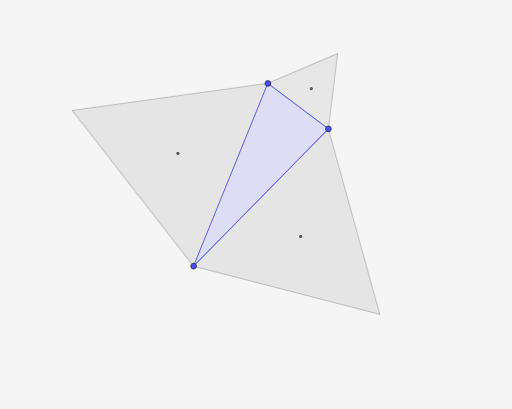
This example demonstrates the geometric relationship between an ellipse and a triangle, involving concepts such as ellipse properties, triangle properties, and vector applications in geometry. Key mathematical concepts include parametric equations of ellipses, properties of triangles, and vector operations. Construction involves GeoGebra commands like Polygon, Angle, Centroid, and Circle, suitable for high school students or college freshmen learning geometric constructions combining geometry and vectors.
GeoGebra Commands & Parameters
Polygon(B, A, C) → V0, c, a, bAngle(B, A, C) → a1Angle(C, B, A) → a2Angle(A, C, B) → a3If(iw ≟ 180°, Polygon[B, A, 3], Polygon[A, B, 3]) → V1If(iw ≟ 180°, Polygon[A, C, 3], Polygon[C, A, 3]) → V2If(iw ≟ 180°, Polygon[C, B, 3], Polygon[B, C, 3]) → V3Centroid(V1) → DCentroid(V2) → ECentroid(V3) → FPolygon(E, D, F) → d1, f, e, dCircle(F, C) → gCircle(C, B) → hIntersect(h, g) → G, H, ,Circle(D, A) → kCircle(B, A) → pIntersect(p, k) → I, J, ,Circle(E, A) → qCircle(A, C) → rIntersect(r, q) → K, L, ,Angle(B, H, C) → αAngle(H, C, B) → βAngle(C, B, H) → γAngle(B, A, J) → δAngle(A, J, B) → εAngle(J, B, A) → ζAngle(L, A, C) → ηAngle(A, C, L) → θAngle(C, L, A) → ιAngle(B, C, G) → κAngle(G, B, C) → λAngle(C, G, B) → μAngle(C, A, K) → νAngle(K, C, A) → ξAngle(A, K, C) → οAngle(A, B, J) → ρAngle(J, A, B) → σAngle(B, J, A) → τAngle(E, F, D) → υAngle(F, D, E) → ϕAngle(D, E, F) → χAngle(E, D, F) → ψAngle(D, F, E) → ωAngle(F, E, D) → α_1
AI Drawing Prompt Reference
Start with a given triangle defined by three points and mark its three interior angles. Construct three auxiliary points by following the orientation along each vertex-to-side position, then determine the three centroids obtained from triangles formed with those auxiliary points. Connect the three centroids to form a new triangle. Draw circles centered at one centroid and at selected original triangle vertices, and compute their intersection points. Use the intersection points together with the original vertices to draw several rays and mark the resulting angles, capturing the angle relationships among the ellipse/triangle style geometry of the construction.
The prompt above was compiled from the original drawing commands and is for reference only.