
Conic Constructions with Alternative Directrix
Loading the math board and drawing, please wait…
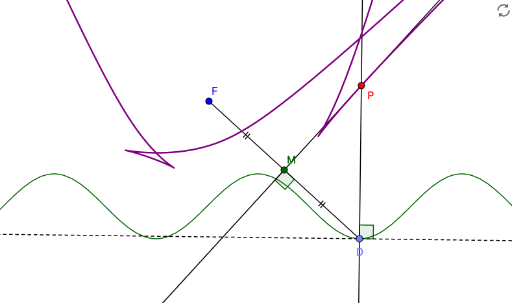
This example demonstrates how to construct conic sections using GeoGebra with an alternative directrix. Key mathematical concepts include the definition of conic sections, the application of directrices, and geometric construction techniques. The construction involves commands and objects such as Point, Tangent, OrthogonalLine, LineBisector, Intersect, Locus, Angle, and Segment. It is suitable for high school and above, particularly for students interested in analytical geometry and conic sections.
GeoGebra Commands & Parameters
Point(f) → DTangent(D, f) → gOrthogonalLine(D, g) → hLineBisector(D, F) → iIntersect(h, i) → PLocus(P, D) → loc1Angle(g, h) → αSegment(F, D) → jIntersect(i, j) → MAngle(i, j) → βSegment(F, M) → kSegment(M, D) → l
AI Drawing Prompt Reference
Draw a hyperbola with focus D and another focus F. First, create a tangent g at point D on curve f, then create the perpendicular line h to g. Next, find the perpendicular bisector i of line segment DF, and determine the intersection P of h and i, whose locus forms a hyperbola. Measure the angle α between g and h, then draw line segment j between F and D, find the intersection M of i and j, measure the angle β between i and j, and finally draw line segments FM and MD.
The prompt above was compiled from the original drawing commands and is for reference only.