
Composite Solid Investigation
Loading the math board and drawing, please wait…
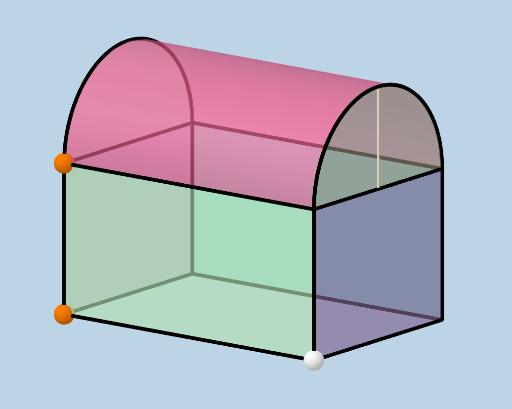
This example demonstrates the construction of a composite solid formed by a cylinder and a prism, exploring key volume and surface area questions. It involves core concepts like solid geometry, volume calculation, surface area calculation, integers, median value, cosine, and 2D vectors. The construction utilizes commands such as Segment, Ray, Point, Line, OrthogonalLine, Intersect, Vector, Translate, Midpoint, Sphere, CircleArc, Surface, CircleSector, and Polygon. Suitable for high school students to understand composite solids and for math competition preparation.
GeoGebra Commands & Parameters
Segment(B, A) → fRay(A, C) → gPoint(g) → ELine(E, D) → hOrthogonalLine(B, h, space) → iIntersect(i, h) → FSegment(B, F) → jSegment(F, E) → kRay(A, G) → lPoint(l) → HVector(A, H) → uTranslate(E, u) → E'Translate(F, u) → F'Translate(B, u) → B'Midpoint(B', H) → IMidpoint(F', E') → JRay((0, 0, 0), (0, 0, 1)) → mSphere(I, H) → aIntersect(m, a) → K, LRay(D, J) → nSphere(J, E') → bIntersect(n, b) → M, NSegment(B', B) → pSegment(B', F') → qSegment(F', F) → sSegment(E, E') → tSegment(E', F') → cSegment(A, H) → dSegment(H, E') → eSegment(H, B') → f_1CircleArc(I, H, L) → c_1Intersect(m, c_1, 1) → OCircleArc(I, O, B') → d_1CircleArc(J, E', N) → e_1Point(e_1) → PCircleArc(J, P, F') → g_1Surface(x(I) + (r * cos(u)), y(I) + v, z(I) + (r * sin(u)), u, 0, π, v, y(I), y(J)) → oCircleSector(I, H, O) → h_1CircleSector(I, O, B') → k_1Polygon(B, A, H, B') → poly1, b_1, a_1, h_2, b'Polygon(A, E, E', H) → poly2, a_2, e_2, e', h_3CircleSector(J, N, E') → q_1CircleSector(J, F', N) → p_1Polygon(E, F, F', E') → poly3, e_3, f_2, f', e'_1Polygon(B, B', F', F) → poly4, b_2, b'_1, f'_1, f_3Segment(A, E) → i_1Segment(A, E) → j_1
AI Drawing Prompt Reference
Draw a composite solid formed by a cylinder and a prism, demonstrating volume and surface area calculations. Start by sketching the bases of the cylinder and prism, then connect corresponding vertices to form the sides. Next, calculate and plot midpoints, vectors, tangents, and arcs, then fill the sides with surfaces and sectors, and use polygons for the bases to fully represent the 3D shape of the composite solid.
The prompt above was compiled from the original drawing commands and is for reference only.