
Complex Number Addition Demonstration by Folens Publishers
Loading the math board and drawing, please wait…
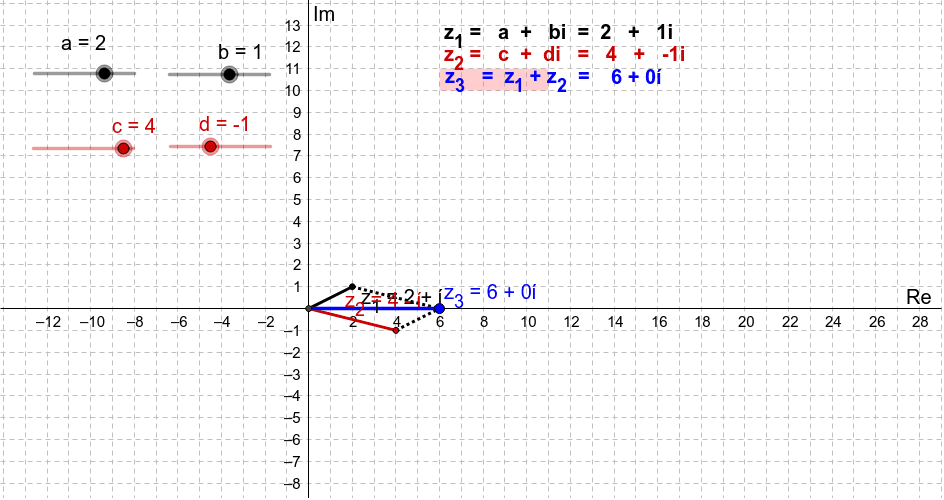
This example visually demonstrates the addition of complex numbers, representing them as vectors in the plane to intuitively show the geometric meaning of addition. Core math concepts include complex numbers, vectors, plane geometry, and the geometric interpretation of addition. GeoGebra commands and objects like Intersect, Vector, Point, Segment, and Polygon are used in the construction. It is suitable for high school students or math enthusiasts to learn the geometric representation of complex number operations, aiding in a deeper understanding of the properties of complex addition.
GeoGebra Commands & Parameters
Intersect(yAxis, xAxis) → OVector(O, (c, d)) → uVector(O, (a, b)) → vPoint(O, v) → z_1Point(O, u) → z_{2}Segment(O, z_1) → gSegment(O, z_{2}) → hPoint(z) → z_3Segment(z_{2}, z_3) → eSegment(z_1, z_3) → fSegment(O, z_3) → jPolygon(A, B, C, D) → poly1, a_1, b_1, c_1, d_1
AI Drawing Prompt Reference
Draw two vectors in a plane representing complex numbers a+b and c+d starting from the origin, mark the corresponding complex number points on the axes, and use the parallelogram rule for vector addition to demonstrate the geometric meaning of complex number addition, connect the points with line segments to form a parallelogram and a triangle, visually showing the geometric effect of the addition operation.
The prompt above was compiled from the original drawing commands and is for reference only.