
Demonstration of Logarithm Laws
Loading the math board and drawing, please wait…
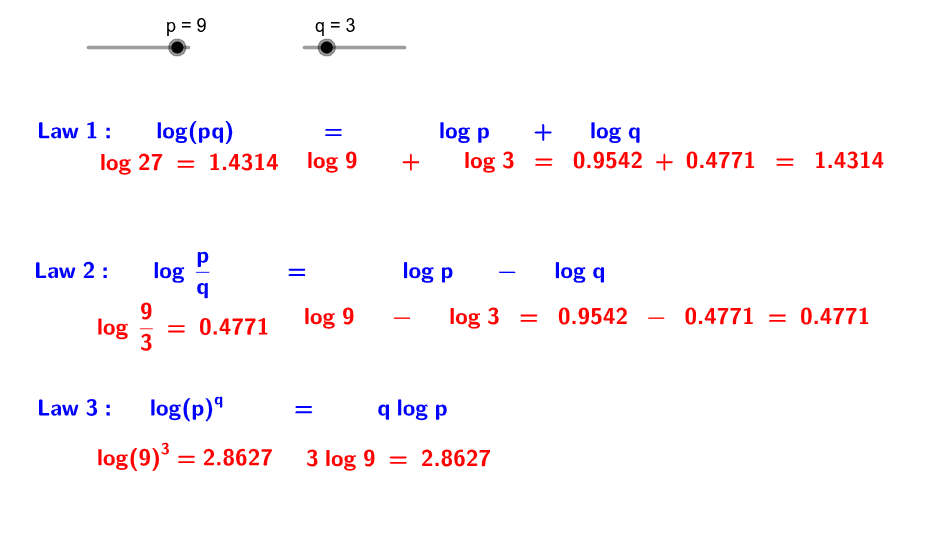
This example dynamically illustrates the application of logarithmic laws, combining logarithmic properties with algebraic operations. Key math concepts include fundamental logarithmic properties (product, quotient, power rules), algebraic simplification, and equation solving. GeoGebra commands used in construction include text1 (text object), p, q (points), b, c, d, e, f, a (variables), text3, text5, text7, text9 (text objects), g, h, i, j, k, l (variables). Suitable for high school mathematics students to understand logarithmic laws and algebraic demonstrations.
GeoGebra Commands & Parameters
Numeric p(9.0)Numeric q(3.0)p * qlg(b)log(p)lg(q)lg(p)lg(p)p / qlg(g)a - ep^(q)lg(j)q * lg(p)
AI Drawing Prompt Reference
Create a dynamic example of logarithmic functions to illustrate the application of logarithmic laws. First, draw two points p and q representing the numbers 9 and 3. Then calculate the product of p and q, representing the multiplication rule of logarithmic laws. Next, draw the logarithmic function lg(b) and display lg(p) and lg(q). Then draw p divided by q, representing the division rule of logarithmic laws. After that, draw the logarithm of g, lg(g), and display a minus e. Then draw p to the power of q, representing the power rule of logarithmic laws. Finally, draw the logarithm of j, lg(j), and display q times lg(p).
The prompt above was compiled from the original drawing commands and is for reference only.