
Comparison of Hexagonal Prism and Triangular Prism
Loading the math board and drawing, please wait…
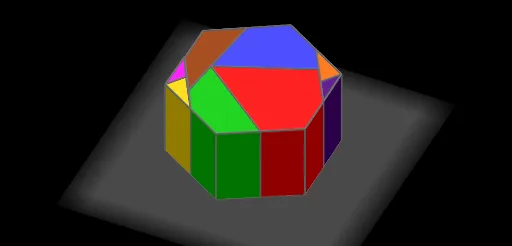
This example demonstrates the geometric construction and volume calculation of a hexagonal prism and a triangular prism. It involves key concepts from polygons, triangles, and solid geometry. Using GeoGebra commands such as Polygon and Prism, the construction process of the prisms can be dynamically shown. Suitable for middle and high school students learning geometry and volume calculation.
GeoGebra Commands & Parameters
Polygon(C, D, 3) → poly1, f, g, h_5, EMidpoint(E, D) → FMidpoint(C, E) → GDistance(C, D) → distanceCDDistance(C, D) → aSegment(K, F) → iPoint(i) → HCircle(K, (0.5 * Distance[K, H])) → cPoint(c) → JMirror(J, K) → J'Circle(J, H) → dIntersect(d, f, 2) → IMirror(H, K) → H'Circle(I, Distance[D, F]) → eIntersect(e, f, 1) → LCircle(J, I) → kSegment(K, L) → jIntersect(k, j, 1) → MMirror(M, K) → M'Polygon(M, I, 3) → poly2, l, m, n, NPolygon(H', M', 3) → poly3, p, q, r, PDistance(N, H) → bPolygon(D, I, J, H, F) → poly4, d_1, i_1, j_1, h_1, f_1Polygon(H, J, K) → poly5, k_1, h_2, j_2Polygon(J', M', K) → poly6, k_2, j', m'Polygon(J, M, K) → poly7, k_3, j_3, m_1Polygon(L, M, J, I) → poly8, l_1, m_2, j_4, i_2Polygon(H', J', K) → poly9, k_4, h', j'_1Distance(G, P) → oPolygon(C, G, J', H', L) → poly10, c_1, g_1, j'_2, h'_1, l_2Polygon(E, F, M', J', G) → poly11, e_1, f_2, m'_1, j'_3, g_2Line(D, C) → sPoint(s) → OPoint(s) → QPolygon(O, Q, 6) → poly12, t, U, n_1, p_1, q_1, r_1, s_1, R, S, TPoint(s) → VPoint(Circle[V, Segment[O, Q]]) → WRotate(W + (Segment[Q, R], 0), Angle[R - Q] + Angle[W - V] - Angle[Q - O], W) → ZRotate(Z + (Segment[R, S], 0), Angle[S - R] + Angle[Z - W] - Angle[R - Q], Z) → A_1Rotate(A_1 + (Segment[S, T], 0), Angle[T - S] + Angle[A_1 - Z] - Angle[S - R], A_1) → B_1Rotate(B_1 + (Segment[T, U], 0), Angle[U - T] + Angle[B_1 - A_1] - Angle[T - S], B_1) → C_1Polygon(V, W, Z, A_1, B_1, C_1) → poly13, v, w, z_1, a_1, b_1, c_2Vector(J', V) → u_1Rotate(E_1, (((-u) * 7.95))°, D_1) → I_1Rotate(H_1, (((-u) * 7.95))°, D_1) → J_1Rotate(F_1, (((-u) * 7.95))°, D_1) → K_1Rotate(G_1, (((-u) * 7.95))°, D_1) → L_1Polygon(L_1, J_1, I_1, D_1, K_1) → poly14, l_3, j_5, i_3, d_2, k_5Rotate(D_1, (-Angle[C, G, J']), K_1) → M_1Ray(K_1, M_1) → t_1Circle(K_1, Distance[G, C]) → e_2Intersect(e_2, t_1, 1) → N_1Rotate(K_1, (-(60°)), N_1) → O_1Ray(N_1, O_1) → n_2Circle(N_1, Distance[C, L]) → p_2Intersect(p_2, n_2, 1) → P_1Rotate(K_1, Angle[G, J', H'], D_1) → Q_1Ray(D_1, Q_1) → q_2Circle(D_1, Distance[J', H']) → r_2Rotate(N_1, (((-u) * 180))°, K_1) → R_1Rotate(P_1, (((-u) * 180))°, K_1) → S_1Rotate(Q_1, (((-u) * 180))°, K_1) → T_1Rotate(D_1, (((-u) * 180))°, K_1) → U_1Polygon(K_1, U_1, T_1, S_1, R_1) → poly15, k_6, u_2, t_2, s_2, r_3Rotate(T_1, Angle[H', J', K], U_1) → V_1Ray(U_1, V_1) → a_2Circle(U_1, Distance[J', K]) → c_3Intersect(c_3, a_2, 1) → W_1Rotate(W_1, (((-u) * 180))°, T_1) → Z_1Rotate(U_1, (((-u) * 180))°, T_1) → A_2Polygon(T_1, A_2, Z_1) → poly16, z_2, t_3, a_3Rotate(T_1, Angle[M, K, J], Z_1) → B_2Ray(Z_1, B_2) → b_2Circle(Z_1, Distance[K, J]) → d_3Intersect(d_3, b_2, 1) → C_2Circle(Z_1, Distance[K, M]) → e_3Intersect(e_3, a_3, 1) → D_2Rotate(C_2, ((u * 180))°, Z_1) → E_2Rotate(D_2, ((u * 178))°, Z_1) → F_2Polygon(E_2, F_2, Z_1) → poly17, z_3, e_4, f_3Rotate(F_2, Angle[M, J, I], E_2) → G_2Ray(E_2, G_2) → g_3Circle(E_2, Distance[J, I]) → h_3Rotate(I_1, Angle[H, F, D], J_1) → H_2Ray(J_1, H_2) → m_3Circle(J_1, Distance[F, D]) → p_3Intersect(p_3, m_3, 1) → I_2Rotate(J_1, 60°, I_2) → J_2Ray(I_2, J_2) → n_3Circle(I_2, Distance[D, I]) → q_3Intersect(q_3, n_3, 1) → K_2Rotate(I_2, Angle[D, I, J], K_2) → L_2Ray(K_2, L_2) → s_3Circle(K_2, Distance[I, J]) → c_4Intersect(c_4, s_3, 1) → M_2Rotate(I_2, ((u * 180))°, J_1) → Q_2Rotate(K_2, Angle[I, J, H], M_2) → N_2Rotate(I_2, ((u * 180))°, J_1) → O_2Rotate(K_2, ((u * 180))°, J_1) → P_2Rotate(M_2, ((u * 180))°, J_1) → R_2Rotate(N_2, ((u * 180))°, J_1) → S_2Polygon(O_2, P_2, R_2, S_2, J_1) → poly18, o_2, p_4, r_4, s_4, j_6Rotate(R_2, Angle[J, I, L], P_2) → T_2Ray(P_2, T_2) → b_3Circle(P_2, Distance[I, L]) → d_4Intersect(d_4, b_3, 1) → U_2Rotate(P_2, Angle[I, L, M], U_2) → V_2Ray(U_2, V_2) → f_4Circle(U_2, Distance[L, M]) → g_4Intersect(g_4, f_4, 1) → W_2Polygon(P_2, U_2, W_2, R_2) → poly19, p_5, u_3, w_2, r_5Rotate(U_2, ((u * 180))°, P_2) → Z_2Rotate(W_2, ((u * 180))°, P_2) → A_3Rotate(R_2, ((u * 180))°, P_2) → B_3Polygon(Z_2, A_3, B_3, P_2) → poly20, z_4, a_4, b_4, p_6Rotate(S_2, Angle[H, J, K], R_2) → C_3Ray(R_2, C_3) → h_4Circle(R_2, Distance[K, J]) → q_4Intersect(q_4, h_4) → D_3,Rotate(D_3, (((-u) * 180))°, S_2) → E_3Rotate(R_2, (((-u) * 180))°, S_2) → F_3Polygon(S_2, F_3, E_3) → poly21, e_5, s_5, f_5Rotate(S_2, Angle[M', K, J'], E_3) → G_3Ray(E_3, G_3) → i_4Circle(E_3, Distance[K, J']) → t_4Intersect(t_4, i_4, 1) → H_3Circle(E_3, Distance[K, M']) → c_5Intersect(c_5, f_5, 1) → I_3Rotate(H_3, ((u * 180))°, E_3) → J_3Rotate(I_3, ((u * 180))°, E_3) → K_3Polygon(J_3, E_3, K_3) → poly22, k_7, j_7, e_6Polygon(E_2, A_3, Z_1) → poly23, z_5, e_7, a_5Prism(poly15, h) → o_1, L_3, face1, face6, arête1, arête5, arête4, arête3, arête2, arête6, arête8, arête9, M_3, arête10, arête7, N_3, O_3, P_3, face2, face5, face4, face3Prism(poly18, h) → v_1, Q_3, face7, face12, arête12, arête13, arête14, arête15, arête11, arête16, arête18, arête19, R_3, arête20, arête17, S_3, T_3, U_3, face9, face10, face11, face8Prism(poly20, h) → w_1, V_3, arête22, arête23, arête24, arête21, arête25, arête27, arête28, arête26, W_3, Z_3, A_4, face15, face16, face14, face13, face17Prism(poly16, h) → v_2, B_4, arête30, arête32, arête34, arête33, C_4, D_4, face20, face21, face19, face18, arête29, arête31Prism(poly17, h) → o_3, E_4, arête35, arête38, arête40, arête39, F_4, G_4, face25, face24, face23, face22, arête36, arête37Prism(poly21, h) → v_3, H_4, arête42, arête44, arête46, arête45, I_4, J_4, face28, face29, face27, face26, arête41, arête43Prism(poly22, h) → w_3, K_4, arête49, arête50, arête52, arête51, L_4, M_4, face31, face32, face33, face30, arête48, arête47Prism(poly14, h) → l_4, N_4, face38, face39, arête57, arête55, arête54, arête53, arête56, arête58, arête60, arête61, O_4, arête62, arête59, P_4, Q_4, R_4, face37, face36, face34, face35
AI Drawing Prompt Reference
Draw a hexagonal prism and a triangular prism to demonstrate their geometric construction and volume calculation. Start by creating a hexagonal base and extending it upward to form the hexagonal prism, while also constructing the triangular prism. Label key points, edges, and faces, such as the vertices and midpoints of the hexagon and triangle, and the side lengths. Use different colors to distinguish the two prisms and annotate their volume formulas.
The prompt above was compiled from the original drawing commands and is for reference only.