
Chrysanthemum Curve
Loading the math board and drawing, please wait…
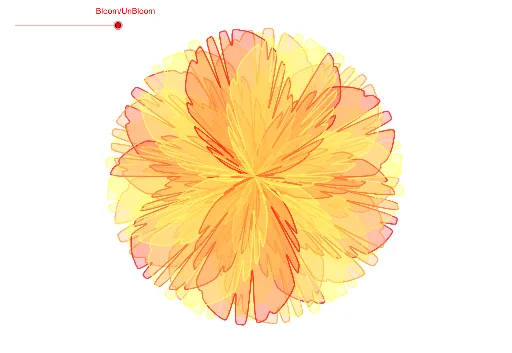
This example demonstrates how to draw the beautiful chrysanthemum curve using parametric equations. It involves core mathematical concepts such as function graphs, parametric equations, trigonometric functions, and coordinate geometry. The construction uses GeoGebra's Curve[Cartesian] command and involves objects like f, p, a, b, c, d, e, g, h, i, j, k, l, m for defining parameters and functions. It is suitable for high school and above students to understand parametric equations and function graphing.
GeoGebra Commands & Parameters
CurveCartesian((f(t) * cos(t)), (f(t) * sin(t)), t, 0, p) → aCurveCartesian((f(t) * cos(t - π / 6)), (f(t) * sin(t - π / 6)), t, 0, p) → bCurveCartesian((f(t) * cos(t - ((2 * π)) / 6)), (f(t) * sin(t - ((2 * π)) / 6)), t, 0, p) → cCurveCartesian((f(t) * cos(t - ((3 * π)) / 6)), (f(t) * sin(t - ((3 * π)) / 6)), t, 0, p) → dCurveCartesian((f(t) * cos(t - ((4 * π)) / 6)), (f(t) * sin(t - ((4 * π)) / 6)), t, 0, p) → eCurveCartesian((f(t) * cos(t - ((5 * π)) / 6)), (f(t) * sin(t - ((5 * π)) / 6)), t, 0, p) → gCurveCartesian((f(t) * cos(t - ((6 * π)) / 6)), (f(t) * sin(t - ((6 * π)) / 6)), t, 0, p) → hCurveCartesian((f(t) * cos(t - ((7 * π)) / 6)), (f(t) * sin(t - ((7 * π)) / 6)), t, 0, p) → iCurveCartesian((f(t) * cos(t - ((8 * π)) / 6)), (f(t) * sin(t - ((8 * π)) / 6)), t, 0, p) → jCurveCartesian((f(t) * cos(t - ((9 * π)) / 6)), (f(t) * sin(t - ((9 * π)) / 6)), t, 0, p) → kCurveCartesian((f(t) * cos(t - ((10 * π)) / 6)), (f(t) * sin(t - ((10 * π)) / 6)), t, 0, p) → lCurveCartesian((f(t) * cos(t - ((11 * π)) / 6)), (f(t) * sin(t - ((11 * π)) / 6)), t, 0, p) → m
AI Drawing Prompt Reference
Draw a beautiful chrysanthemum curve using parametric equations, involving multiple curves formed by cosine and sine functions, rotating around a central point at different angles from 0 to 300 degrees, creating a symmetric and aesthetically pleasing petal-like pattern.
The prompt above was compiled from the original drawing commands and is for reference only.