
Chrysanthemum (3D) – A 3D Flower Built from Polar Curves
Loading the math board and drawing, please wait…
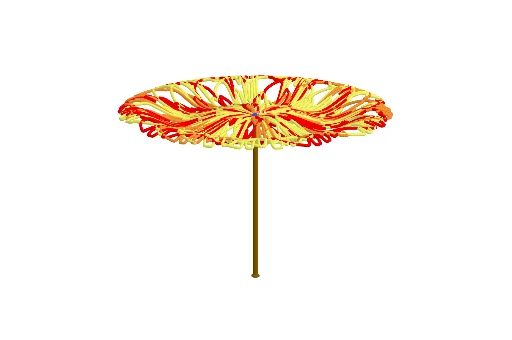
This example demonstrates how to construct a three-dimensional chrysanthemum flower using polar curves, transforming 2D petal shapes into a layered 3D blossom through rotation and spatial arrangement. The core mathematical concepts involve polar equations, parametric curves, 3D rotations, complex numbers, and solid geometry including cylinders and curve combinations. Construction highlights: using GeoGebra commands such as CurveCartesian to define the base polar curve, Rotate to replicate petals in 3D space, Cylinder to create the stem, and Line, Dilation, and other transformations to adjust scaling and positioning, with multiple objects (f, p, a, b, c, d, etc.) coordinated. Suitable for high school and above students or math enthusiasts, this example is ideal for exploring the visualization of parametric equations and 3D geometry, as well as for mathematical art projects or classroom demonstrations.
GeoGebra Commands & Parameters
CurveCartesian((f(t) * cos(t)), (f(t) * sin(t)), ((f(t) / 20 + 0.2) * sin((f(t) * ((2 * π)) / 7))), t, 0, p) → aCurveCartesian((f(t) * cos(t - π / 6)), (f(t) * sin(t - π / 6)), ((f(t) / 20 + 0.2) * sin((f(t) * ((2 * π)) / 7))), t, 0, p) → bCurveCartesian((f(t) * cos(t - ((2 * π)) / 6)), (f(t) * sin(t - ((2 * π)) / 6)), ((f(t) / 20 + 0.2) * sin((f(t) * ((2 * π)) / 7))), t, 0, p) → cCurveCartesian((f(t) * cos(t - ((3 * π)) / 6)), (f(t) * sin(t - ((3 * π)) / 6)), ((f(t) / 20 + 0.2) * sin((f(t) * ((2 * π)) / 7))), t, 0, p) → dCurveCartesian((f(t) * cos(t - ((4 * π)) / 6)), (f(t) * sin(t - ((4 * π)) / 6)), ((f(t) / 20 + 0.2) * sin((f(t) * ((2 * π)) / 7))), t, 0, p) → eCurveCartesian((f(t) * cos(t - ((5 * π)) / 6)), (f(t) * sin(t - ((5 * π)) / 6)), ((f(t) / 20 + 0.2) * sin((f(t) * ((2 * π)) / 7))), t, 0, p) → gCurveCartesian((f(t) * cos(t - ((6 * π)) / 6)), (f(t) * sin(t - ((6 * π)) / 6)), ((f(t) / 20 + 0.2) * sin((f(t) * ((2 * π)) / 7))), t, 0, p) → hCurveCartesian((f(t) * cos(t - ((9 * π)) / 6)), (f(t) * sin(t - ((9 * π)) / 6)), ((f(t) / 20 + 0.2) * sin((f(t) * ((2 * π)) / 7))), t, 0, p) → kCurveCartesian((f(t) * cos(t - ((10 * π)) / 6)), (f(t) * sin(t - ((10 * π)) / 6)), ((f(t) / 20 + 0.2) * sin((f(t) * ((2 * π)) / 7))), t, 0, p) → lCurveCartesian((f(t) * cos(t - ((11 * π)) / 6)), (f(t) * sin(t - ((11 * π)) / 6)), ((f(t) / 20 + 0.2) * sin((f(t) * ((2 * π)) / 7))), t, 0, p) → mCurveCartesian((f(t) * cos(t - ((8 * π)) / 6)), (f(t) * sin(t - ((8 * π)) / 6)), ((f(t) / 20 + 0.2) * sin((f(t) * ((2 * π)) / 7))), t, 0, p) → iCylinder(A, B, 0.2) → j, j_2, j_3, j_4Line(A, B) → nRotate(a, α, n) → a'Rotate(b, α, n) → b'Rotate(c, α, n) → c'Rotate(d, α, n) → d'Rotate(e, α, n) → e'Rotate(g, α, n) → g'Rotate(h, α, n) → h'Rotate(i, α, n) → i'Rotate(k, α, n) → k'Rotate(l, α, n) → l'Rotate(m, α, n) → m'
AI Drawing Prompt Reference
Create a 3D chrysanthemum flower composed of multiple petals defined by polar curves, forming a 3D structure through rotation and spatial arrangement. First, define a polar curve, then rotate multiple copies around a central point to form the petals. Next, create a cylinder as the stem, and finally combine all petals and the stem.
The prompt above was compiled from the original drawing commands and is for reference only.