
Cubes Arranged Around a Torus
Loading the math board and drawing, please wait…
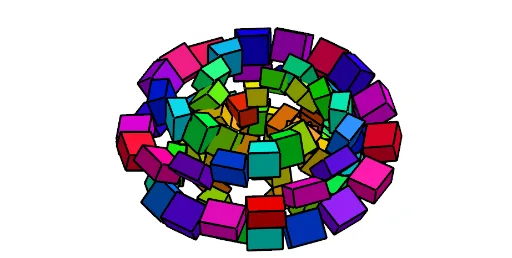
① This example demonstrates how a series of cubes can be systematically placed along the surface of a torus, creating a decorative 3D arrangement that encircles the ring. ② Core mathematical concepts include parametric surfaces (torus), point generation along space curves, sequence and list operations, and rotational symmetry in solid geometry. ③ Construction highlights: using GeoGebra commands such as Join, Sequence, Surface, and Element, with objects t, b, a, n, O, g, k, m, liste3, Length, e, h, liste5, liste1, c, A, B, image1, C, D, image2, hauteur, l1, l2, Color, and A1 through A15, the torus is defined via parametric equations, and cube positions are generated sequentially on its surface, with color and height variables enhancing the visual effect. ④ Suitable for high school to university-level teaching in mathematics or computer graphics, this example helps students understand parametric surfaces, 3D modeling, and sequence generation, and can also serve as a creative geometric art project.
GeoGebra Commands & Parameters
Join(Sequence[Sequence[(x(O) + ((a + 0.2 + ((b + 0.2) * cos(j + t))) * cos(s)), y(O) + ((a + 0.2 + ((b + 0.2) * cos(j + t))) * sin(s)), z(O) + ((b + 0.2) * sin(j + t))), s, 0, 6.28319, (2 * π / n)], j, 0, 6.28319, (2 * π / n)]) → liste3Sequence(Polygon[Element[liste3, i], Element[liste3, i + 1], Element[liste3, i + 1 + (2 * n) + e], Element[liste3, i + e + (2 * n)]], i, 1, Length[liste3], h) → liste5Sequence(Polygon[Element[liste3, i], Element[liste3, i + 1], Element[liste3, i + 1 + e + (2 * n)], Element[liste3, i + e + (2 * n)]], i, 1, Length[liste3], h) → liste1Surface(x(O) + ((a - 0.05 + ((b - 0.05) * cos(j))) * cos(s)), y(O) + ((a - 0.05 + ((b - 0.05) * cos(j))) * sin(s)), z(O) + ((b - 0.05) * sin(j)), j, 0, Length, s, 0, 6.28319) → cSequence(Prism[Element[liste5, i], hauteur], i, 1, Length[liste5]) → l1Sequence(Prism[Element[liste5, i], hauteur], i, 1, Length[liste5]) → l2Element(l1, A1) → B1Element(l1, A2) → B2Element(l1, A3) → B3Element(l1, A4) → B4Element(l1, A5) → B5Element(l1, A6) → B6Element(l1, A7) → B7Element(l1, A8) → B8Element(l1, A9) → B9Element(l1, A10) → B10Element(l1, A11) → B11Element(l1, A12) → B12Element(l1, A13) → B13Element(l1, A14) → B14Element(l1, A15) → B15Element(l1, A16) → B16Element(l1, A17) → B17Element(l1, A18) → B18Element(l1, A19) → B19Element(l1, A20) → B20Element(l1, A21) → B21Element(l1, A22) → B22Element(l1, A23) → B23Element(l1, A24) → B24Element(l1, A25) → B25Element(l1, A26) → B26Element(l1, A27) → B27Element(l1, A28) → B28Element(l1, A29) → B29Element(l1, A30) → B30Element(l1, A31) → B31Element(l1, A32) → B32Element(l1, A33) → B33Element(l1, A34) → B34Element(l1, A35) → B35Element(l1, A36) → B36Element(l1, A37) → B37Element(l1, A38) → B38Element(l1, A39) → B39Element(l1, A40) → B40Element(l1, A41) → B41Element(l1, A42) → B42Element(l1, A43) → B43Element(l1, A44) → B44Element(l1, A45) → B45Element(l1, A46) → B46Element(l1, A47) → B47Element(l1, A48) → B48Element(l1, A49) → B49Element(l1, A50) → B50Element(l1, A51) → B51Element(l1, A52) → B52Element(l1, A53) → B53Element(l1, A54) → B54Element(l1, A55) → B55Element(l1, A56) → B56Element(l1, A57) → B57Element(l1, A58) → B58Element(l1, A59) → B59Element(l1, A60) → B60Element(l1, A61) → B61Element(l1, A62) → B62Element(l1, A63) → B63Element(l1, A64) → B64Element(l1, A65) → B65Element(l1, A66) → B66Element(l1, A67) → B67Element(l1, A68) → B68Element(l1, A69) → B69Element(l1, A70) → B70Element(l1, A71) → B71Element(l1, A72) → B72Element(l1, A73) → B73Element(l1, A74) → B74Element(l1, A75) → B75Element(l1, A76) → B76Element(l1, A77) → B77Element(l1, A78) → B78Element(l1, A79) → B79Element(l1, A80) → B80Element(l1, A81) → B81Element(l1, A82) → B82Element(l1, A83) → B83Element(l1, A84) → B84Element(l1, A85) → B85Element(l1, A86) → B86Element(l1, A87) → B87Element(l1, A88) → B88Element(l1, A89) → B89Element(l1, A90) → B90Element(l1, A91) → B91Element(l1, A92) → B92Element(l1, A93) → B93Element(l1, A94) → B94Element(l1, A95) → B95Element(l1, A96) → B96Element(l1, A97) → B97Element(l1, A98) → B98Element(l1, A99) → B99Element(l1, A100) → B100
AI Drawing Prompt Reference
Create a decorative 3D arrangement showing a series of cubes systematically placed along the surface of a torus, forming a ring around it. The torus is defined by parametric equations, and cubes are generated and positioned along its surface using sequences and lists, with rotational symmetry. Variable heights and colors of the cubes enhance the visual effect, resulting in a symmetric and layered artistic composition.
The prompt above was compiled from the original drawing commands and is for reference only.