
Centroid of a Lamina Between x=a and x=b for a Quadratic Curve
Loading the math board and drawing, please wait…
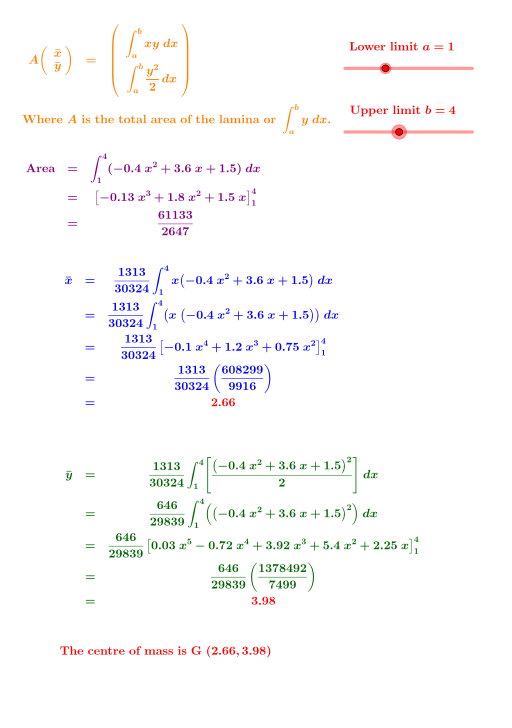
This example demonstrates how to compute and visualize the centroid (center of mass) of a lamina bounded by a quadratic curve and the vertical lines x=a and x=b. It connects the physical idea of center of mass for continuous regions with rigorous calculus: the centroid coordinates are obtained from area integrals using the region’s area and first moments. Key construction concepts include integrating over the x-interval [a,b], forming the numerator/denominator expressions for centroid formulas, and translating symbolic results into an interactive geometric scene. From the GeoGebra construction summary, it uses Expand and Integral to build and simplify the required integral expressions; FractionText to present the centroid-related fractional results; Root to solve for key quantities when needed; and geometric primitives such as Line and OrthogonalLine for reference axes/normal directions. Segment, Angle, and Vector support visual annotations, including boundary segments and a vector pointing toward the centroid, while Rotate and other auxiliary objects help organize the final diagram. Suitable for high school advanced math through early university calculus, especially for teaching centroid concepts and graph-integral interpretation.
GeoGebra Commands & Parameters
Expand((x * f(x))) → pRoot(f, 0.1, 20) → A_1Integral(f, n, d) → eIntegral(f, x) → gFractionText(e) → text5FractionText(h) → text6Integral(p, x) → qIntegral(p, n, d) → iFractionText(i) → text8FractionText(k) → text10Expand((f(x))^(2)) → rIntegral(r, x) → sIntegral(r, n, d) → lFractionText(l) → text11Root(f, -20) → DMax(f, -20, 20) → EVector(B, G) → uRotate(G, α + 90°, B) → G'Vector(B, G') → vRotate(A, α + 90°, B) → A'Segment(B, A') → tSegment(G', B) → f_1Angle(G', B, A') → βAngle(A, B, G) → γRotate(f, α + 90°, B) → f_2Line(B, A') → g_1OrthogonalLine(B, t) → h_1Segment(G, C) → i_1Angle(B, C, G) → δ
AI Drawing Prompt Reference
Draw a region bounded by a quadratic curve y=f(x) and vertical lines at x=a and x=b, and calculate and display the centroid of this region. First, draw the quadratic curve, then draw the vertical lines at x=a and x=b. Next, calculate the area and first moments of the region, and use these to find the centroid coordinates. Finally, draw a vector from a boundary point to the centroid, and rotate this vector to show its direction.
The prompt above was compiled from the original drawing commands and is for reference only.