
Line Integrals: Work
Loading the math board and drawing, please wait…
In collections
MATH1052-edX
This example demonstrates the application of line integrals in calculating work done by a variable force along a curve. Key math concepts include vector fields, curve integrals, and definite integrals in vector calculus. GeoGebra commands like SelectedIndex, Midpoint, Element, Derivative, ParametricDerivative, Distance, CurveCartesian, Integral, Textfield, Segment, If, Sequence, and Translate are used to construct vector fields, parametric curves, and compute the integral. Suitable for university-level STEM students learning vector calculus applications.
GeoGebra Commands & Parameters
SelectedIndex(pathNames) → pathIndexMidpoint(N, P) → QElement(pathList, pathIndex) → pathDerivative(path) → DDpathParametricDerivative(path) → DpathDistance(N, P) → NPElement(CompX, pathIndex) → RTXDerivative(RTX, x) → DRTXElement(CompY, pathIndex) → RTYDerivative(RTY, x) → DRTYCurveCartesian(x(path(t)), y(path(t)), t, 0, s) → partPathIntegral(MUL, 0, 1) → WorkTextfield(F_1) → InputBox1Textfield(F_2) → InputBox2Segment(path(0.3), path(0.3 + 0.01)) → arrow1Segment(path(0.6), path(0.6 + 0.01)) → arrow2If(Work ≟ Work, Work, Sum[Sequence[((path(i + dS) - path(i)) * (F_1(x(path(i + dS / 2)), y(path(i + dS / 2))), F_2(x(path(i + dS / 2)), y(path(i + dS / 2))))), i, 0, s - dS, dS]]) → WOORKSequence(Vector[path(i), path(i) + ((scale * F_1(x(path(i)), y(path(i)))), (scale * F_2(x(path(i)), y(path(i)))))], i, 0, s, 0.15) → PathVectors, {(0.10000000000000009, -0.10000000000000009), (0.06999999999999995, -0.06999999999999995), (0.03999999999999998, -0.03999999999999998), (0.010000000000000009, -0.010000000000000009), (-0.01999999999999999, 0.01999999999999999), (-0.050000000000000044, 0.050000000000000044), (-0.08000000000000007, 0.08000000000000007)}Sequence(path(i), i, 0.25, 0.75, 0.25) → PtPathList, {(0.5, -0.5), (0, 0), (-0.5, 0.5)}Sequence(Vector[(0, 0), (1 / sqrt((y(DDpath(i)))^(2) + (x(DDpath(i)))^(2)) * (x(DDpath(i)), y(DDpath(i))))], i, 0.25, 0.75, 0.25) → tangvectorsList, {(-0.7071067811865475, 0.7071067811865475), (-0.7071067811865475, 0.7071067811865475), (-0.7071067811865475, 0.7071067811865475)}Translate(Vector[Element[tangvectorsList, 1]], Element[PtPathList, 1]) → uuTranslate(Vector[Element[tangvectorsList, 2]], Element[PtPathList, 2]) → vvTranslate(Vector[Element[tangvectorsList, 3]], Element[PtPathList, 3]) → wwTextfield(xA) → InputBox3Textfield(yA) → InputBox4Textfield(xB) → InputBox5Textfield(yB) → InputBox6
AI Drawing Prompt Reference
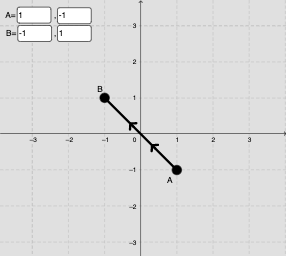
Draw a 2D vector field with a parametric curve path. Along the path, place arrows representing the force field direction. Select three equally spaced points on the path and draw unit tangent vectors at these points. Also draw several small displacement vectors along the path to approximate the work done by the force. Include input boxes for the two force components and four input boxes for the start and end coordinates of the path. Display the computed work value as a label.
The prompt above was compiled from the original drawing commands and is for reference only.