
Catenoid
Loading the math board and drawing, please wait…
In collections
Curves and Surfaces
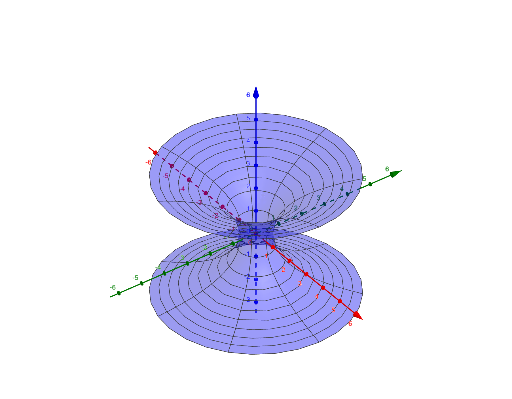
This example demonstrates the formation of a catenoid, a surface generated by rotating a catenary curve about an axis. It involves key mathematical concepts such as functions, rotation, and solid geometry. Using the Surface command in GeoGebra, the construction process of the catenoid is visually illustrated. Suitable for high school mathematics education and students learning solid geometry.
GeoGebra Commands & Parameters
Surface(((c * u) * cos(v)), ((c * u) * sin(v)), acosh(u), u, (-2 * π), (2 * π), v, 0, (2 * π)) → aSurface(((c * u) * cos(v)), ((c * u) * sin(v)), (-acosh(u)), u, (-2 * π), (2 * π), v, 0, (2 * π)) → b
AI Drawing Prompt Reference
Create a catenoid surface by rotating a catenary-like curve. In 3D, let u vary over [-2π, 2π] and let v be an angle sweeping from 0 to 2π around the symmetry axis. Use a parametric surface where the radial coordinates are (c·u)·cos(v) and (c·u)·sin(v), while the height is acosh(u). Also construct the companion surface with the same radial part but height -acosh(u), so the two halves match the same rotational relationship and together form the full catenoid shape.
The prompt above was compiled from the original drawing commands and is for reference only.