
Calculating Parallelogram Area by Daniel Mentrard
Loading the math board and drawing, please wait…
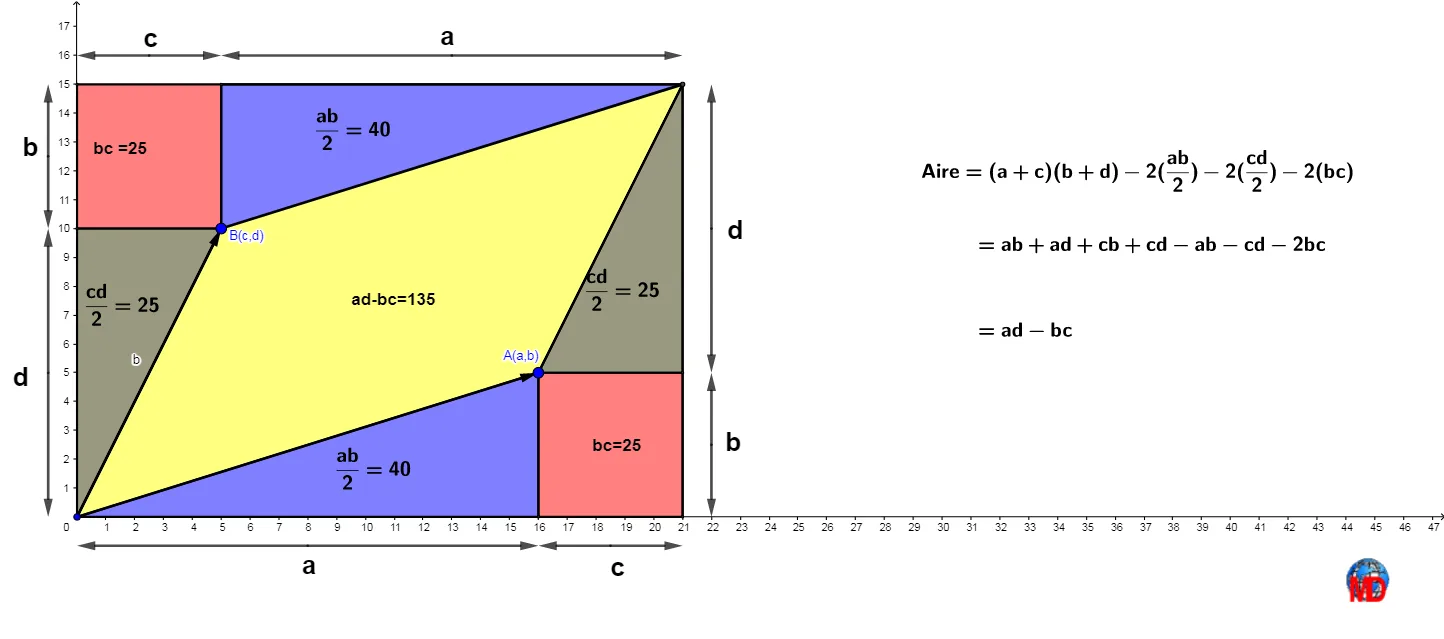
This example demonstrates how to calculate the area of a parallelogram using vector cross product and base times height. Key math concepts include vectors, vector cross product, polygon construction, and coordinate geometry. It constructs the parallelogram and auxiliary segments using commands like Intersect, Vector, Translate, Polygon, Segment, Centroid, and Midpoint, making it suitable for high school mathematics teaching and student learning of spatial vector applications.
GeoGebra Commands & Parameters
Intersect(xAxis, yAxis) → OVector(O, A) → uVector(O, B) → vTranslate(A, v) → PPolygon(O, A, P, B) → poly1, o, a, p, bPolygon(O, C, A) → poly2, a_1, o_1, cPolygon(H, B, P) → poly3, p_1, h, b_1Polygon(P, A, E) → poly4, e, p_2, a_2Polygon(F, B, O) → poly5, o_2, f, b_2Polygon(A, C, D, E) → poly6, a_3, c_1, d, e_1Polygon(F, B, H, G) → poly7, f_1, b_3, h_1, gSegment(B, P) → iSegment(P, A) → jSegment(A, E) → kSegment(E, P) → lSegment(D, E) → mSegment(A, C) → nSegment(H, P) → qSegment(H, B) → rSegment(B, F) → sSegment(G, H) → tCentroid(poly2) → ICentroid(poly1) → JCentroid(poly3) → KCentroid(poly4) → LCentroid(poly5) → MCentroid(poly6) → NCentroid(poly7) → QMidpoint(Z, B_1) → F_1Midpoint(Z, A_1) → G_1Midpoint(W, V) → H_1Midpoint(V, U) → I_1Midpoint(R, S) → J_1Midpoint(S, T) → K_1Midpoint(D_1, E_1) → L_1Midpoint(E_1, C_1) → M_1Vector(F_1, B_1) → wVector(F_1, Z) → u_1Vector(G_1, Z) → v_1Vector(G_1, A_1) → w_1Vector(H_1, W) → d_1Vector(H_1, V) → g_1Vector(I_1, V) → i_1Vector(I_1, U) → j_1Vector(J_1, S) → k_1Vector(J_1, R) → l_1Vector(K_1, S) → m_1Vector(K_1, T) → n_1Vector(L_1, E_1) → q_1Vector(L_1, D_1) → r_1Vector(M_1, C_1) → s_1Vector(M_1, E_1) → t_1
AI Drawing Prompt Reference
Draw a parallelogram formed by two vectors originating from a common point, with the fourth vertex determined by the vector sum. Construct several auxiliary triangles and quadrilaterals inside and around the parallelogram, using vertices, points on edges, and additional points, creating a grid-like pattern. Include the diagonals of the parallelogram and the sides of all auxiliary shapes. Mark the centroids of each polygonal region and the midpoints of selected segments. The overall figure illustrates vector operations and area decomposition in a coordinate plane.
The prompt above was compiled from the original drawing commands and is for reference only.