
Building Similar Cones: Testing Similarity with Dilation
Loading the math board and drawing, please wait…
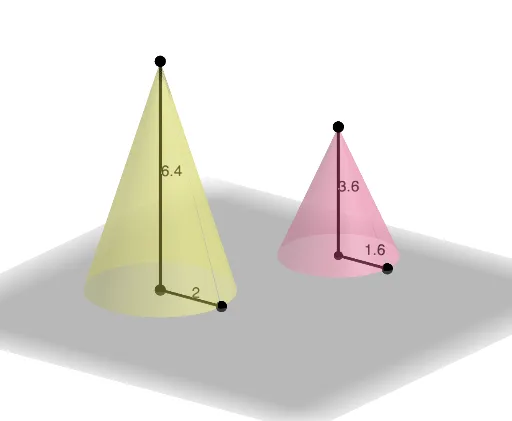
This GeoGebra activity demonstrates how to construct a pair of right circular cones and then test whether the cones are similar by interactively modifying their defining geometry. It focuses on the core idea of similarity in solid geometry and uses a dilation (similarity transformation) to create a candidate cone that should correspond under proportional scaling. Key concepts include similarity, correspondences between geometric elements, and using a scale factor to preserve shape relationships. Construction-wise, the model uses PointIn to place defining points, then Point, Line, and Segment to build the cone’s generatrix/axis structure, Surface to render the cone solids, and Intersect to compute critical intersection points that enforce the configuration. The command Dilate is used to apply proportional scaling to relevant elements, and Max (together with auxiliary quantities/flags such as check) supports an automated verification of the similarity conditions. Suitable for secondary advanced geometry, exploratory classroom work, and introductory 3D geometry instruction.
GeoGebra Commands & Parameters
PointIn(Plane[(0, 0, 0), (1, 0, 0), (1, 1, 0)]) → BPoint(Segment[B, B + (0, 0, 10)]) → ASegment(A, B) → fPoint(Segment[B, B + (20, 0, 0)]) → CSegment(A, C) → gSegment(B, C) → hPointIn(Plane[(0, 0, 0), (1, 0, 0), (1, 1, 0)]) → DPoint(Segment[D, D + (0, 0, 10)]) → EPoint(Segment[D, D + (20, 0, 0)]) → FSegment(D, E) → iSegment(E, F) → jSegment(F, D) → kSurface(j, n, Line[D, E]) → bSurface(g, n, Line[A, B]) → aLine(A, E) → lIntersect(l, Plane[(0, 0, 0), (1, 1, 0), (0, 1, 0)]) → GDilate(b, check, G) → b'Max(c, d) → eDilate(a, check, G) → a'
AI Drawing Prompt Reference
Please draw two right circular cones and test if they are similar. First, place points A, B, C, D, E, F in 3D space. Connect these points to form line segments f, g, h, i, j, k. Use Surface to render the cone b generated by line segment j and line D-E, and cone a generated by line segment g and line A-B. Then, draw a line connecting point A and point E, and compute its intersection with a plane to get point G. Finally, use Dilate to scale cones b and a to verify similarity.
The prompt above was compiled from the original drawing commands and is for reference only.