
Build Your Own Right Triangular Prism by Tim Brzezinski (2)
Loading the math board and drawing, please wait…
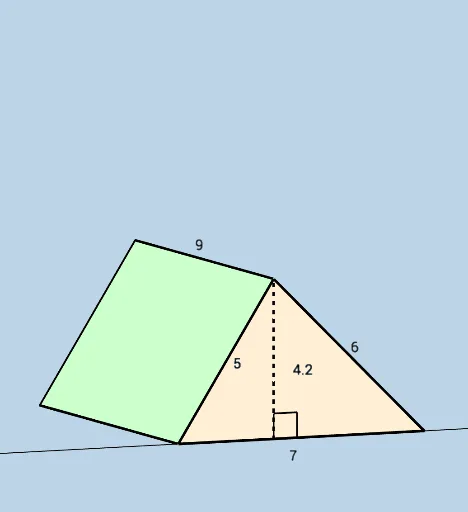
This example demonstrates how to construct and explore a right triangular prism with a dynamic and modifiable interface. Users can delve into geometric properties like volume and surface area. Key math concepts include solid geometry, polygon area calculation, and vectors. Construction highlights involve commands/objects like Segment, Circle, Intersect, Polygon, Prism, OrthogonalLine, Line, Angle, Textfield, Volume in GeoGebra. Suitable for high school students and math enthusiasts for geometry learning and exploration.
GeoGebra Commands & Parameters
Segment(A, B) → fCircle(A, b) → dCircle(B, c) → eIntersect(d, e) → C, D, ,Segment(A, C) → gSegment(C, B) → iPolygon(A, B, C) → t1, c_1, a_1, b_1Prism(t1, (-h)) → j, F, edgeCH, edgeFG, edgeGH, edgeFH, G, H, faceABGF, faceBCHG, faceACHF, faceFGH, edgeAF, edgeBGOrthogonalLine(C, f) → kLine(A, B) → lIntersect(l, xAxis) → IIntersect(k, l) → JSegment(C, J) → mAngle(B, J, C) → αTextfield(b) → InputBox2Textfield(a) → InputBox1Textfield(c) → InputBox3Textfield(h) → InputBox4Volume(j) → VOL